> ## Documentation Index
> Fetch the complete documentation index at: https://glasser.ai/docs/llms.txt
> Use this file to discover all available pages before exploring further.
# Build with Glasser
Glasser connects your product to paid data from specialist Providers. Use your
product's Glasser Key, or let users connect their own Glasser account with a Key
or MCP sign-in. Runs use the connected Workspace's balance.
## How it works
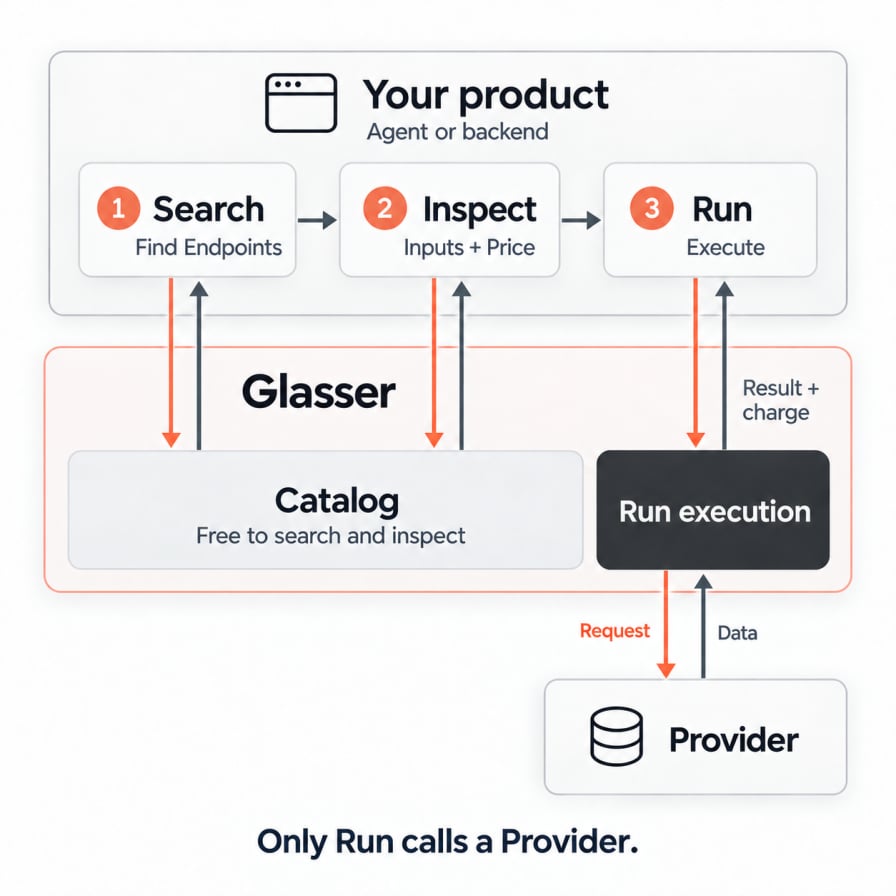
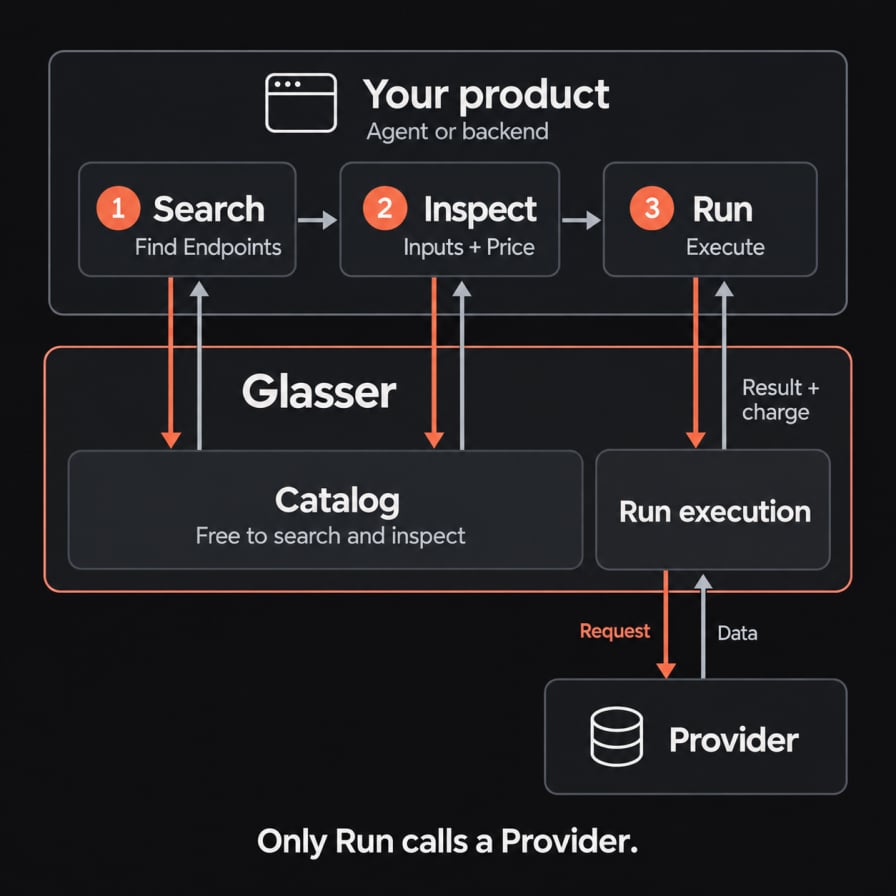
An **Endpoint** is a specific data operation from a Provider. Your product's
Agent or backend chooses which Endpoint to use through three steps:
1. **Search** the Catalog to find Endpoints that match the data you need.
2. **Inspect** an Endpoint to read its input schema and Price.
3. **Run** the selected Endpoint with your input. Glasser calls the Provider and
records the execution as a **Run**, with its status, result, and charge.
Search and Inspect query Glasser's Catalog for free; they do not call a Provider.
A Run can incur a charge under the Endpoint's Price. Once you have selected and
inspected an Endpoint, you can reuse it without searching before every Run.
## Example: check an Instagram creator
> I'm considering sponsoring @mkbhd. Check likes and comments on his 10 latest Instagram posts before I commit.
**Query:** “Instagram profile recent posts engagement”
One matching result:
**Provider:** Apify (`apify`)
**Endpoint:** `/apify/instagram-post-scraper`
Ask Glasser to inspect that **Provider + Endpoint**.
**Input schema:** `username` — required array with one username.
**Also returns:** current Price and charging rules.
Run the same **Provider + Endpoint**, then wait for the Run to complete.
**Input:** `username` = `["mkbhd"]`
**Returns:** up to 10 public posts with captions, like counts, and comment counts, plus the Run charge.
Your Agent compares the posts' engagement to help you assess the sponsorship.
## What are you building?
Let an Agent find and choose data for each user request.
Use this when the questions and required data change from task to task.
Connect a known Provider and Endpoint to a product feature.
Use this when you already know which data to retrieve each time.
The main difference is **who selects the Endpoint, and when**. In the Agent path,
the Agent can choose during a task. In the specific Endpoint path, you make that
choice while building the feature. Both paths use the same Data Sources and
Run API, and your product can use both.
## Optional: Solutions
Glasser currently offers the **GTM Solution** with six predefined capabilities:
Web research, Company intelligence, People search, SEO research, Social research,
and Market data.
These capabilities wrap supported Endpoints. For example, **Company intelligence**
accepts a domain to look up a company. Glasser handles Provider selection, input
mapping, and fallback for supported failures.
See [Solutions overview](/docs/api-reference/solutions/overview) for supported actions
and inputs.
This documentation is built and hosted on [Mintlify](https://mintlify.com), a developer documentation platform.