Glasser connects your product to paid data from specialist Providers. Use your product’s Glasser Key, or let users connect their own Glasser account with a Key or MCP sign-in. Runs use the connected Workspace’s balance.

How it works

An Endpoint is a specific data operation from a Provider. Your product’s Agent or backend chooses which Endpoint to use through three steps:
  1. Search the Catalog to find Endpoints that match the data you need.
  2. Inspect an Endpoint to read its input schema and Price.
  3. Run the selected Endpoint with your input. Glasser calls the Provider and records the execution as a Run, with its status, result, and charge.
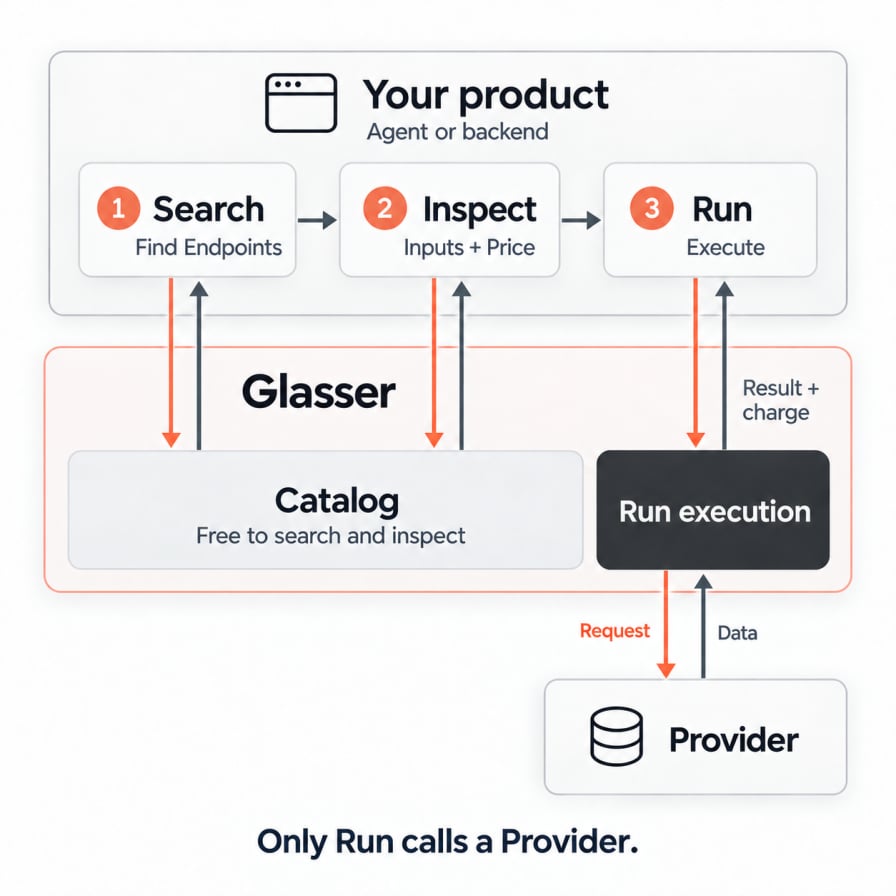
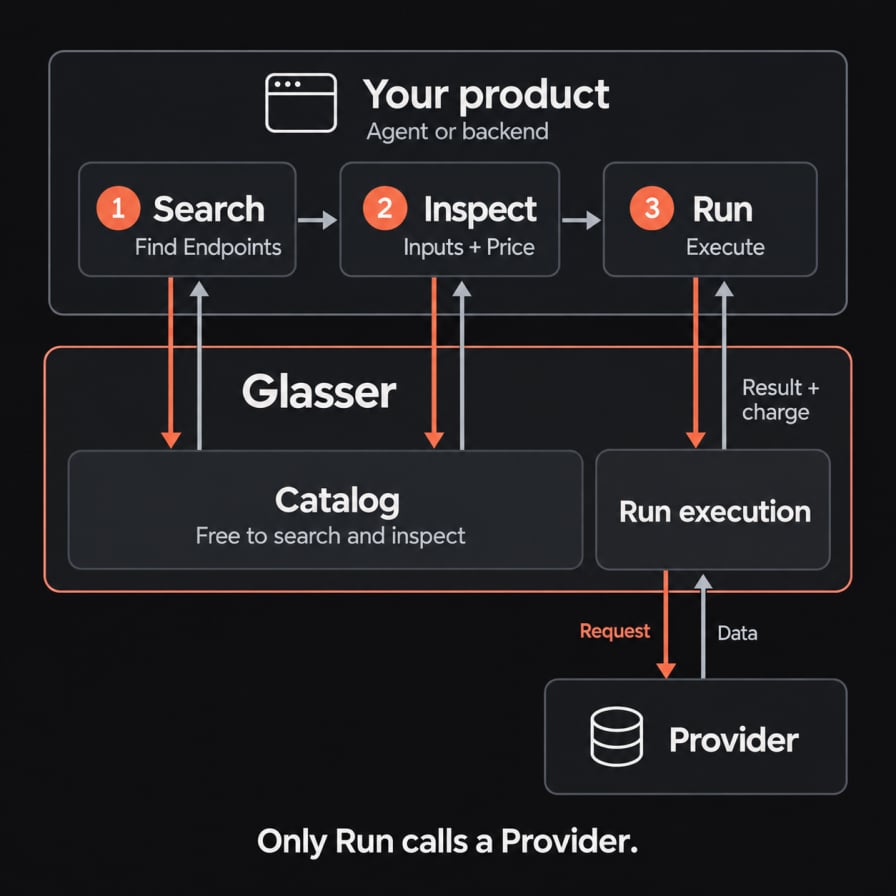
Your product's Agent or backend follows Search, Inspect, then Run. Search finds Endpoints and Inspect reads their input schemas and Prices from Glasser's Catalog for free. Only Run executes the selected Endpoint with a Provider. The Provider returns data to Glasser, and Glasser returns the Run result and charge to your product.
Search and Inspect query Glasser’s Catalog for free; they do not call a Provider. A Run can incur a charge under the Endpoint’s Price. Once you have selected and inspected an Endpoint, you can reuse it without searching before every Run.

Example: check an Instagram creator

I’m considering sponsoring @mkbhd. Check likes and comments on his 10 latest Instagram posts before I commit.
1

Search

Query: “Instagram profile recent posts engagement”One matching result:
Provider: Apify (apify)
Endpoint: /apify/instagram-post-scraper
2

Inspect

Ask Glasser to inspect that Provider + Endpoint.Input schema: username — required array with one username.
Also returns: current Price and charging rules.
3

Run

Run the same Provider + Endpoint, then wait for the Run to complete.Input: username = ["mkbhd"]
Returns: up to 10 public posts with captions, like counts, and comment counts, plus the Run charge.
Your Agent compares the posts’ engagement to help you assess the sponsorship.

What are you building?

Power your product's Agent

Let an Agent find and choose data for each user request.Use this when the questions and required data change from task to task.

Call a specific Endpoint

Connect a known Provider and Endpoint to a product feature.Use this when you already know which data to retrieve each time.
The main difference is who selects the Endpoint, and when. In the Agent path, the Agent can choose during a task. In the specific Endpoint path, you make that choice while building the feature. Both paths use the same Data Sources and Run API, and your product can use both.

Optional: Solutions

Glasser currently offers the GTM Solution with six predefined capabilities: Web research, Company intelligence, People search, SEO research, Social research, and Market data. These capabilities wrap supported Endpoints. For example, Company intelligence accepts a domain to look up a company. Glasser handles Provider selection, input mapping, and fallback for supported failures. See Solutions overview for supported actions and inputs.