


Glasser Team8 min read
Exa vs Tavily: Compare Search Output, Task Cost, and Migration Work
Compare Exa vs Tavily on search modes, content output, and task cost. Use a matched-task checklist to choose a provider and plan migration.

If you are comparing Exa vs Tavily, you probably already know that both can retrieve web information for an AI application. The harder question is whether a different search tool will improve the answer enough to justify changes to your application.
Start with Exa when its people/company categories, content controls, or choice of search modes match your task. Start with Tavily when its search-and-extract workflow and explicit depth-based credit model fit the application you want to build. Treat both as candidates for general sourced question answering until you have run the same tasks through them.
This comparison uses official documentation checked on September 23, 2026. It includes reproducible evaluation instructions and hypothetical budgets. It does not report our own head-to-head quality or speed test.
Choose based on the task you need to finish
| Your task | First configuration to evaluate | Why it belongs on the shortlist |
|---|---|---|
| Find company pages or professional profiles | Exa with a supported category | The API exposes people/company categories; validate their filter restrictions |
| Feed an interactive application a small set of sources | Exa fast or Tavily basic | Both offer documented search configurations suited to an initial retrieval step; measure latency yourself |
| Find pages, then retrieve selected URLs | Tavily Search plus Extract, or Exa Search plus Contents | Both have separate content paths; compare the actual evidence returned |
| Support a research answer with several sources | A deeper mode on each provider, with a fixed output requirement | Extra search effort is useful only if it changes the quality of the final evidence |
| Replace an existing integration | The closest configuration to your current output contract | Preserving source fields and failure behavior is essential to a safe migration |
These are selection hypotheses derived from documented controls. They do not establish that a provider is more accurate on your queries.
Write the task as an observable outcome. “Find five pages” is weaker than “find the official limitations for this API version and quote the passages supporting each limitation.” The second wording lets you recognize when more results add noise rather than value.
Compare modes, filters, and returned content
Exa's controls
Exa's current Search reference includes auto, fast, instant, deep-lite, deep, and deep-reasoning. The modes have different goals; compare a named mode rather than treating “Exa” as one fixed operation.
The category parameter includes people and company searches. The documentation limits filter combinations for those categories: publication date filters and excludeDomains are not supported there. A filter available for general web search may therefore be invalid for a people search. Exa Search reference
Exa also supports retrieving contents from known URLs. Decide whether to request evidence in the search operation or use a later content call for selected pages. Contents reference
Tavily's controls
Tavily Search exposes search depth, result limits, domain filters, and content/answer options. Its automatic parameter setting can select a more expensive depth, so pin the comparison settings and inspect the reported configuration. An automatically generated answer should not replace checking the underlying sources. Tavily Search reference
Tavily Extract accepts URLs separately. A successful HTTP response can include individual extraction failures; inspect both results and failed_results. Match records by URL, since output ordering is not guaranteed. Extract reference
Compare the evidence, not the field names
| Requirement | Exa evaluation | Tavily evaluation | Acceptance rule you own |
|---|---|---|---|
| Relevant sources | Inspect returned results for the chosen mode/category | Inspect returned results for the chosen depth/topic | Sources directly address the query |
| Useful page content | Check requested text/highlights | Check result content, raw content, or Extract output | Enough evidence survives for the answer |
| Date constraints | Use supported publication filters | Use the appropriate time/date controls | Check dates on a sample of actual pages |
| Domain constraints | Use supported include/exclude settings | Use documented domain settings | Every accepted source follows your policy |
| Unavailable content | Preserve the failure or missing content | Inspect per-URL failures | Missing text must not become an invented citation |
Source scores are provider-specific. Do not copy a threshold such as “accept score above 0.8” from one service to another without calibration.
Compare the cost of equivalent work
Exa's published Search base rate is $7 per 1,000 requests for up to ten results. Its deeper offerings and optional features have separate rates. Tavily's PAYG rate is $0.008 per credit; basic search uses one credit and advanced uses two. Exa pricing · Tavily credits
A search-only baseline
For 1,000 ordinary search requests, with no extra operations or add-ons:
| Configuration | Hypothetical paid subtotal |
|---|---|
| Exa Search, up to 10 results | $7 |
| Tavily basic | $8 |
| Tavily advanced | $16 |
This table compares billing configurations. It does not claim that their outputs have equal quality, length, or recall. Free credits, subscriptions, tax, and model usage are excluded so the paid rates remain visible.
A retrieval task with separate extraction
Assume each task makes two searches and then makes a separate request to retrieve five selected pages. All five extractions succeed. For Exa, assume ordinary Search followed by one content type from Contents; for Tavily, assume basic Extract.
| Configuration | Calculation | Retrieval subtotal per task |
|---|---|---|
| Exa Search + separate Contents | 2 × $0.007 + 5 × $0.001 | $0.019 |
| Tavily basic + basic Extract | (2 × 1 + 1) credits × $0.008 | $0.024 |
| Tavily advanced + basic Extract | (2 × 2 + 1) credits × $0.008 | $0.040 |
The Exa Contents assumption uses its published $1/1,000 pages per content type. Tavily basic extraction uses one credit per five successful URLs. These examples intentionally specify a separate extraction step. If the search response already contains adequate evidence, remove that step from both the workflow and its budget.
Add actual paid retries and model input/output costs. Longer retrieved text can increase model spend even when the retrieval price stays the same. If you shorten the text for one provider, apply a comparable evidence budget to the other before judging answer quality.
The free allowances also have different units: Exa publishes dollar credits, while Tavily provides monthly API credits. Convert them using the selected operations. A credit count is not automatically the number of questions your agent can answer.
Run a comparison that can change your decision
Use two evaluation tracks: a fixed-output track and a fixed-spend track. The first asks which configuration supplies the evidence you need. The second asks how well each performs inside the same retrieval budget.
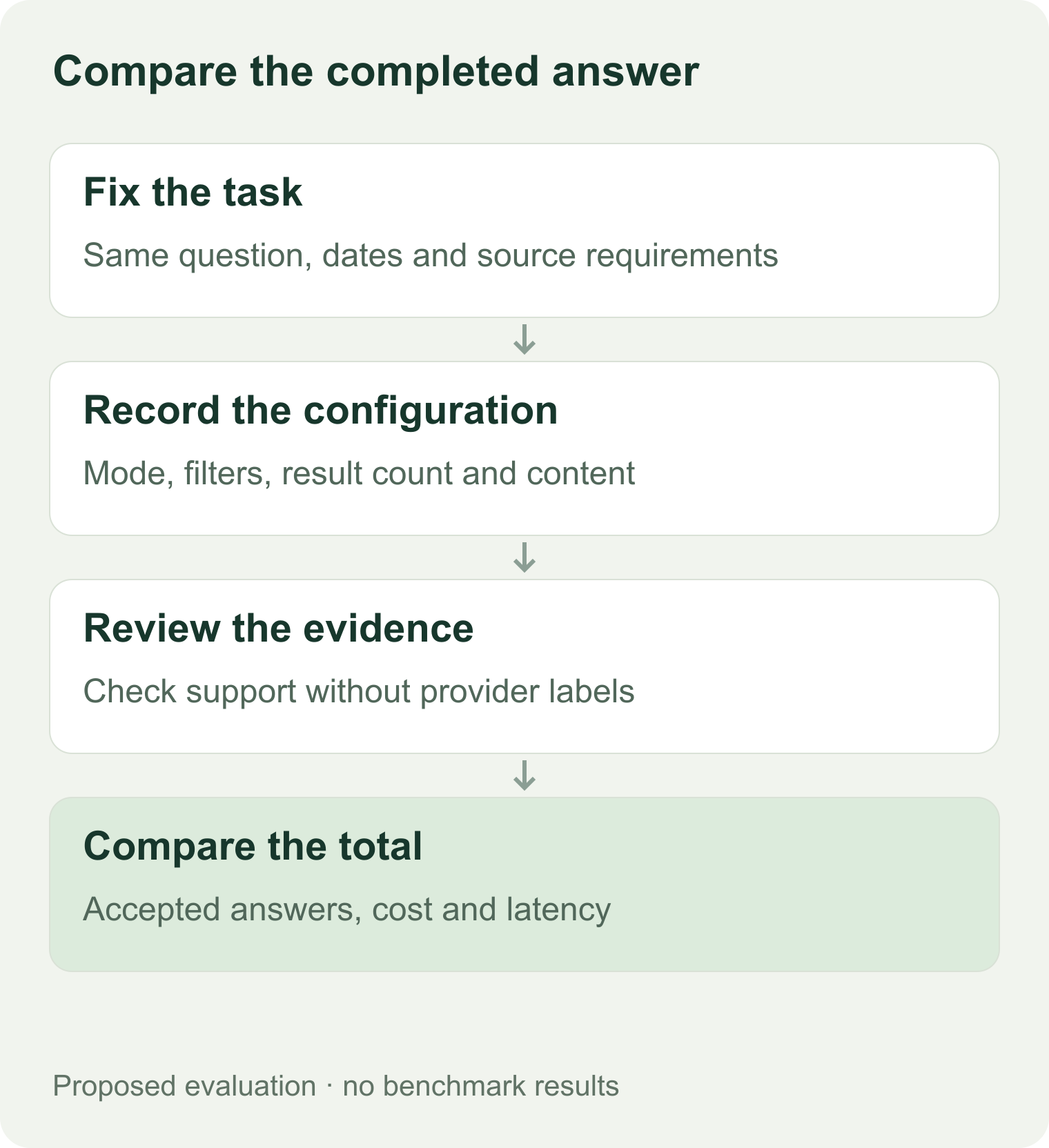
Proposed evaluation process. No benchmark scores are implied.
A practical starter set has 12 questions: four narrow official-document lookups, four recent-event questions, and four multi-source comparisons. Add people/company searches if those are a real part of your workload.
For each question:
- Save the expected source or a written acceptance rule before viewing results.
- Record the exact query, date filters, domain restrictions, result limit, and mode.
- Save returned URLs and the passages the model actually receives.
- Use the same model and prompt for downstream answers.
- Have a reviewer mark unsupported claims and missing evidence without seeing the provider label.
- Record total retrieval cost, model tokens, and end-to-end latency.
Use the comparison worksheet to keep these records. Report the number of accepted answers, not just the number of successful API calls. For a small sample, report individual failures rather than treating a tiny score difference as decisive.
Read vendor benchmarks with their settings attached
Exa publishes a Tavily comparison and methodology. Its named configurations, task selection, and judge determine what the results mean. In the version reviewed for the Brief, Exa fast was compared with Tavily advanced. That evidence can help you choose test cases; it does not establish a universal winner for different modes or your workload.
Do not combine one provider's advertised latency with another's result from an unrelated test. Measure both within your application, including content retrieval and retries, if speed drives the decision.
Plan the migration before switching providers
A search integration includes more than the HTTP call. Your code may rely on a particular score scale, content field, date representation, retry condition, or citation format.
| Migration area | What to check |
|---|---|
| Query and mode | Defaults, automatic settings, and mode-specific costs |
| Filters | Allowed combinations, date semantics, and domain behavior |
| Content | Missing text, truncation, passage length, and extraction failures |
| Identity | Use URLs or stable source identifiers; do not match extracted pages by array position |
| Errors | Distinguish authentication, throttling, budget limits, empty results, and failed content retrieval |
| Accounting | Record the actual charged unit and all operations required for the task |
Keep a provider-independent record of the evidence your answer used. Switch on a small set of representative tasks first. Your acceptance condition might require every factual answer to have a supporting source and no increase in unsupported claims, within a stated cost and latency budget. Those thresholds are yours to set; this article does not claim they have been met.
Where Glasser fits
Our Glasser inspection confirmed an Exa /search endpoint at $0.007/call, with a $0 no-result clause, up to 25 results, and a limited set of inputs. The inspected schema did not expose Exa's type mode selector. Direct Exa mode descriptions therefore should not be treated as Glasser request parameters.
We have not verified a Tavily endpoint in Glasser for this comparison. Evaluate Tavily directly when you need it. Before using the Glasser Exa path, inspect its current contract and follow the documented schema and price. Glasser's execution and billing model governs that path.
Keeping two providers can be useful when a measured task group benefits from each. It also creates two sets of quota handling, result normalization, and regression checks. Add that complexity only after your evaluation gives it a specific purpose.
Exa and Tavily decision questions
Is Exa better for finding people and companies?
Its dedicated categories make it a clear candidate to evaluate for that task. Confirm supported filters and check whether returned pages identify the intended people or companies. This article has no sample-level evidence to claim higher recall or accuracy.
Is Tavily cheaper?
It depends on depth, extraction, volume plan, and how many calls finish the task. A basic query consumes half the search credits of an advanced query. Compare the actual task pattern before extrapolating a monthly bill.
Does Tavily vs Exa require different prompts?
You may need different query or retrieval configuration, but keep the downstream answer prompt fixed during the initial comparison. Otherwise, a prompt change can be mistaken for a search-quality improvement.
Which should I choose first?
Choose the provider whose documented controls match your hardest common task. Use the smallest relevant configuration, review its evidence, and expand only when the result is insufficient. Your migration decision should come from accepted answers and total task cost on your own sample.
Related posts

8 min read
Free Web Search API: Choose by Output, Free Limits, and Task Cost
Compare free web search API tiers for AI agents and Google SERP data. See which return links or content, then budget search and extraction together.

14 min read
Lead Enrichment: How to Enrich B2B Leads and Choose the Right Tools
Turn incomplete B2B leads into usable CRM records. Compare enrichment tools, resolve conflicting data, and calculate cost per usable lead.
Make your agent
work with real data.
Search, inspect, and run data APIs through one Glasser key. Turn your next question into a result you can use.
Get started with Glasser