


Glasser Team8 min read
Free People Search API: Find Candidates Before Paying for Contact Data
Find out what a free people search API returns before paying. Compare profile previews, enrichment, and contact-reveal costs for B2B prospecting.

You want engineering leaders at a set of companies. A search API returns 200 matches for free—but the rows contain no email addresses. Has it solved your problem?
It may have solved the discovery step. Whether that is enough depends on what you need next: a shortlist for research, a professional profile, or a contact channel.
For a free people search API, evaluate Apollo's documented zero-credit search and Hunter's free masked search first. Treat contact enrichment or reveal as a separate purchase. This guide covers B2B prospect discovery, using official documentation and Glasser endpoint contracts checked on September 23, 2026. It does not cover consumer background checks or private records.
Decide whether you need search, enrichment, or reveal
| Operation | What you start with | What you are trying to get |
|---|---|---|
| People search | Company, job, location, or other supported filters | A set of possible people |
| Person enrichment | A known person's email, profile URL, or supported identity details | Additional fields for that person |
| Masked preview | Search criteria | Evidence of matching records without all contact fields |
| Reveal | A valid handle from an earlier preview | The available details associated with that handle |
A flag such as “email available” tells you that a provider has an email-related field. It is not the email itself, and it does not establish that the address is suitable for your intended use.
If you already have a LinkedIn URL for every person, a person-enrichment endpoint is the more direct category to evaluate. If you only have a list of target companies and roles, start with search. Keeping these operations separate makes both API selection and billing easier to understand.
Compare API options by what is actually free
| Option | Documented discovery access | What remains separate | Input or integration consideration |
|---|---|---|---|
| Apollo People API Search, direct | 0-credit search; free accounts must be registered with a work email | Search does not return emails or phone numbers; enrichment is a separate endpoint | Person/company filters and pagination must match the API reference |
| Hunter Multi-Domain Search, direct | Free masked search across matching companies | Reveal retrieves contact details and consumes credits | Requires at least one filter; uses cursor pagination |
| Glasser → Hunter masked search | Inspected contract: $0.00/call | Glasser reveal contract: $0.02695 per returned result, capped at $1.25/call | Requires Glasser access; free price does not mean anonymous or unlimited access |
| Glasser → People Data Labs search | Paid comparison option: $0.30 per returned record, capped at $3/call | Returned fields depend on provider coverage | SQL or Elasticsearch query; inspected wrapper allows up to 10 people/call |
Sources: Apollo People API Search, Hunter Multi-Domain Search, PDL Person Search, and the Glasser contracts inspected for this article. Glasser contract and pricing model
When free discovery is enough
A research task may only need to identify likely companies and roles before a person reviews the shortlist. In that situation, you may not need to buy contact details for every candidate.
A recruiting or sales workflow that needs an individual email has a second acceptance condition. Test that condition separately. A large count of free matches is not a large count of usable contacts.
Apollo documents that its search endpoint omits email and phone. Its enrichment API has its own credit rules, including different behavior when waterfall providers are involved. Apollo enrichment reference
Hunter's direct search documents masked results and reveal handles. The endpoint's free price does not settle every account permission or rate limit. Confirm those before promising a continuing free production workflow. Use a small request to establish what your account can access, then read the returned data rather than inferring fields from the product name.
Build a two-stage discovery workflow
Suppose your task is to find engineering leaders at selected software companies in a specific market. First decide whether “in the market” means the person's location or the company's headquarters. Those filters can produce different lists.
Write the target as a short acceptance rule: “Current engineering leadership at one of these companies; a professional identity we can verify; contact data only after the candidate passes review.”
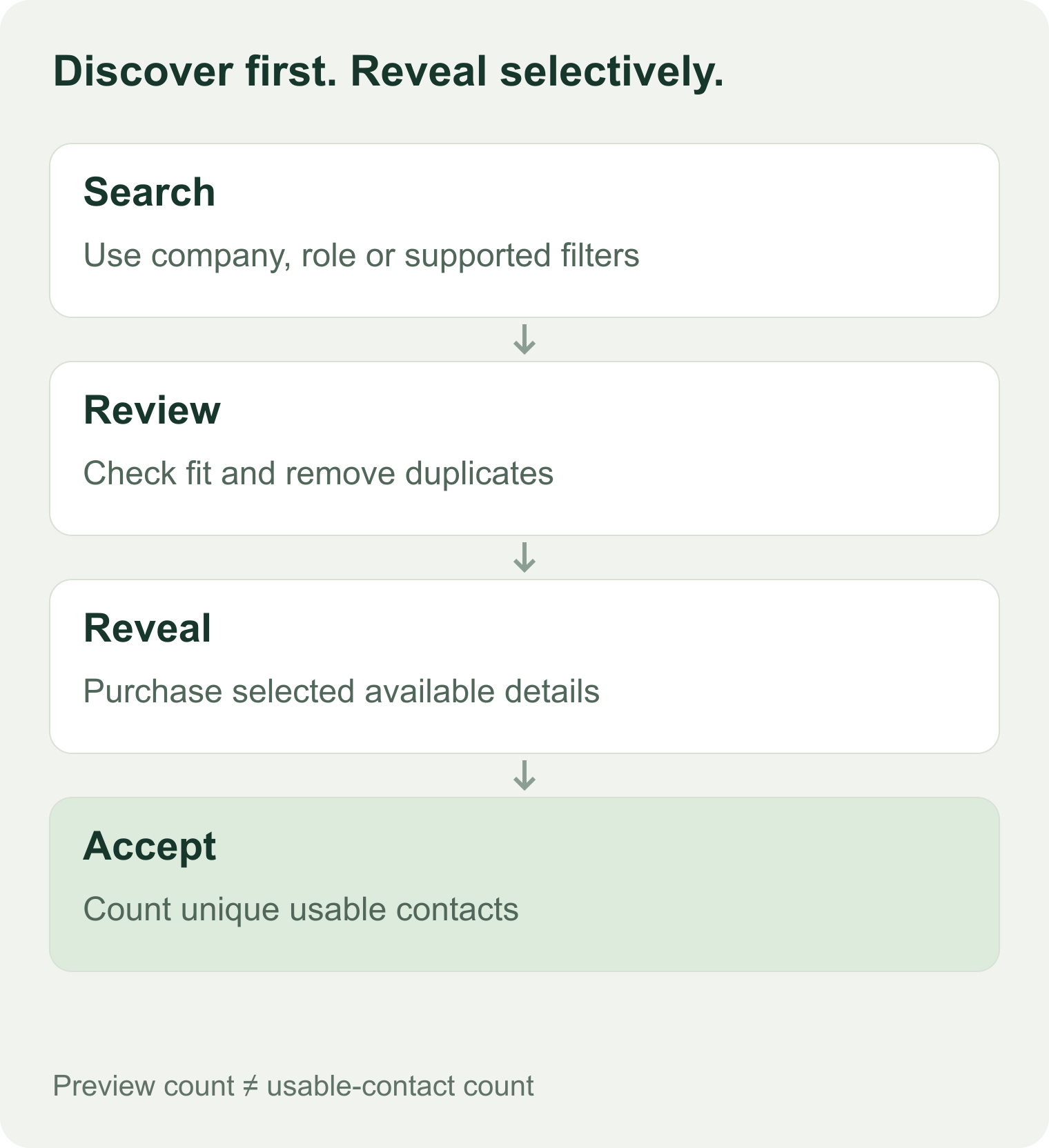
Suggested application workflow. The search result and the final usable contact are separate milestones.
1. Start with one filter you can check
Use a company or a small employer set you know. Review the first page before adding seniority, department, or geography. If a filter causes all results to disappear, you can then identify which condition changed the result.
Filter vocabulary matters. Hunter direct documents catalog IDs for some filters and specified formats for others. Apollo also defines how individual filters combine and which refer to the person versus the company. Copy values from the selected endpoint's current reference rather than sending convenient labels and assuming they mean the same thing.
2. Save the preview and its origin
Keep the query, source account, retrieval time, returned identifier or reveal handle, and the fields actually visible. Preserve missing fields. Do not create a full name or email from a masked value.
Glasser's inspected Hunter search schema exposes company_name, industry, location, department, seniority, type, limit, and search_after. It permits up to 25 rows per call. This is a specific wrapper contract; it does not expose every native Hunter filter. Inspect the current Glasser endpoint before constructing an input.
3. Review and deduplicate candidates
Reject obvious employer mismatches and unrelated roles before spending on reveal. Deduplicate by a reliable provider identifier or known profile URL where available. Names alone are weak deduplication keys.
Retain the cursor supplied by the endpoint when continuing a search. Do not turn it into an offset or reuse it for a different query without documentation supporting that behavior. For Glasser's inspected PDL wrapper, no pagination parameter was exposed; do not promise that one query can simply page through the full dataset.
4. Reveal only selected records
Hunter's direct documentation scopes reveal handles to your team and the current billing period. Use handles returned by that team's search; do not treat them as permanent identifiers.
For the Glasser Hunter route, the inspected reveal contract accepts up to 25 handles and charges for returned results. Use the handles generated through the same supported workflow; this article has not verified cross-surface or cross-account handle compatibility. Read the current contract before executing the paid operation.
5. Accept the result by your actual task
After reveal, check current employer, role, required fields, and contact status. A returned row can still fail your requirements. Save the fee even when your application rejects the result; a business rejection is not automatically a provider no-result outcome.
The evaluation sheet separates preview rows, reveal decisions, and accepted contacts. It contains no example personal records.
Measure discovery quality separately from contact coverage
A hypothetical test illustrates why the distinction matters:
| Stage | Unique records | What the number means |
|---|---|---|
| Search candidates reviewed | 100 | Starting sample after deduplication |
| Candidates meeting employer and role requirements | 65 | 65% task fit on this sample |
| Candidates selected for reveal | 40 | Your purchasing decision |
| Selected candidates with the required contact fields | 28 | 70% required-field coverage among selected candidates |
| Contacts accepted after final checks | 24 | 60% usable yield among selected candidates |
These numbers are fictional. They are not an estimate of any provider's performance.
Report how the sample was selected. Choosing only the easiest 40 candidates can make contact coverage look better than the full target audience would support. Include common names, role synonyms, recent employer changes, and sparse profiles in a real evaluation.
Track three common failure modes:
- Filter mismatch: the API returns an employer or role outside your requested scope.
- Stale employment: the person is real but no longer belongs to the target account.
- Missing contact data: the profile fits, but the fields needed for the next task are absent.
These failures suggest different actions. Another search query may help a filter problem; it will not necessarily fix missing contact coverage.
Calculate search and reveal costs separately
For a two-stage workflow:
Total = discovery charges + reveal/enrichment charges + required verification + any paid repeats.
Under Glasser's inspected Hunter prices, five masked-search calls would have a $0 discovery subtotal. Suppose two reveal calls each return 20 billable results. Each call costs 20 × $0.02695 = $0.539, below the $1.25 per-call cap. The combined reveal subtotal is $1.078.
If 24 unique contacts pass your final checks, the reveal cost per usable contact is $1.078 ÷ 24 ≈ $0.0449. Verification, infrastructure, and manual review are excluded. The returned counts and acceptance rate are hypothetical; they are not a live test.
For a separate PDL example, ten returned people at the inspected $0.30/result rate cost $3, the call cap. A person with missing fields may still be a returned, billable record. Compare the exact output requirement before treating that price as interchangeable with a contact-reveal operation.
An expired reveal handle may require returning to discovery. Do not budget on the assumption that it will remain usable indefinitely. Save the period and source context with the handle, and check the provider's current rules.
Questions about free people search
Can I use a people search API free without an account?
The options reviewed here require authenticated access. A zero-credit or $0 operation is a billing statement, not a promise of anonymous access or unlimited capacity.
Can I search for any private person's details?
This guide evaluates B2B discovery from professional filters. It does not establish access to private records, consumer background data, or identity verification. Select a service whose documented data and permitted use match your task.
Does a preview's email-availability flag guarantee a usable email?
No. It indicates available data according to the provider's response. You still need to obtain the field through the supported operation and check whether it meets your identity, employer, and contact requirements.
Which option should I try first?
Try Apollo direct for documented zero-credit prospect discovery, or Hunter's masked search when a review-before-reveal workflow fits. Use PDL as a paid comparison when its query model and available person fields match the application. Review one page of real authorized candidates before committing to a large reveal or enrichment batch.
Related posts

14 min read
Lead Enrichment: How to Enrich B2B Leads and Choose the Right Tools
Turn incomplete B2B leads into usable CRM records. Compare enrichment tools, resolve conflicting data, and calculate cost per usable lead.

8 min read
LinkedIn Profile API Pricing: Compare Access Models and Calculate Usable-Record Cost
Compare LinkedIn profile API access models and estimate costs for 100, 1,000, or 10,000 profiles. Account for returned records, retries, and usable data.
Make your agent
work with real data.
Search, inspect, and run data APIs through one Glasser key. Turn your next question into a result you can use.
Get started with Glasser