


Glasser Team14 min read
Lead Enrichment: How to Enrich B2B Leads and Choose the Right Tools
Turn incomplete B2B leads into usable CRM records. Compare enrichment tools, resolve conflicting data, and calculate cost per usable lead.

A lead arrives with a name, a company, and an empty job-title field. Your sales team needs to know who should follow up. An enrichment tool returns a title and an email—but names a different employer.
Would you update the CRM?
That decision is where a useful lead enrichment workflow earns its place. Adding fields is easy. Knowing which fields to trust, what to leave alone, and when to stop looking takes a few clear rules.
Start with one question: What information would change our next action? If company size determines routing, enrich company size. If a rep needs a work email, find and verify that address. Leave unrelated fields out of the first pass.
What is lead enrichment?
Lead enrichment is the process of adding or updating information about leads you already have. That can include a person's role, current employer, work email, or the company's industry and size.
For example, a name and company domain might be enough to retrieve a matching professional profile. You can then use the returned role to qualify the lead, a company attribute to assign an owner, or a work email to prepare outreach.
B2B lead enrichment connects an incomplete record to a specific sales decision. It is one use of data enrichment, which also applies to customer, financial, and other datasets.
Three tasks often sit together in sales lead enrichment:
| Task | Starting point | Result you need |
|---|---|---|
| Lead generation | A target audience or account list | New people or companies to evaluate |
| Lead enrichment | An existing lead with missing or old information | Additional, better-supported fields |
| Email verification | An email address you already have | A deliverability assessment at the time of checking |
A returned email is a candidate contact channel. Check its verification status before treating it as ready for outreach. A matched profile still needs an identity check before it becomes trusted CRM data.
What does an enriched lead look like?
Start with the information you already have
Stronger identifiers make contact enrichment easier. A profile URL is more specific than a name shared by hundreds of people.
| What you have | A useful next step | Check before accepting the result |
|---|---|---|
| A work email | Look up the associated person and employer | Does the returned identity match the lead? |
| A LinkedIn profile URL | Retrieve a matching professional record | Is the URL matched, and is the employment information current enough? |
| A full name and company domain | Match the person within that company | Could a colleague share the name? Has the person changed jobs? |
| A name alone | Add a company, domain, profile URL, or another supported identifier | Avoid auto-updating a record from an ambiguous name match |
These are real input constraints, not just workflow preferences. Prospeo's person enrichment documentation accepts an email, a LinkedIn URL, or a name with employer information. It recommends a company website over a company name alone. People Data Labs' input reference also requires supported identifying information or a name combined with additional context.
Compare the original and enriched record
Consider Maya Chen at Aster Analytics. The name, company, and .example domain below are fictional. This data enrichment example illustrates your own normalized CRM record, rather than a live provider response.
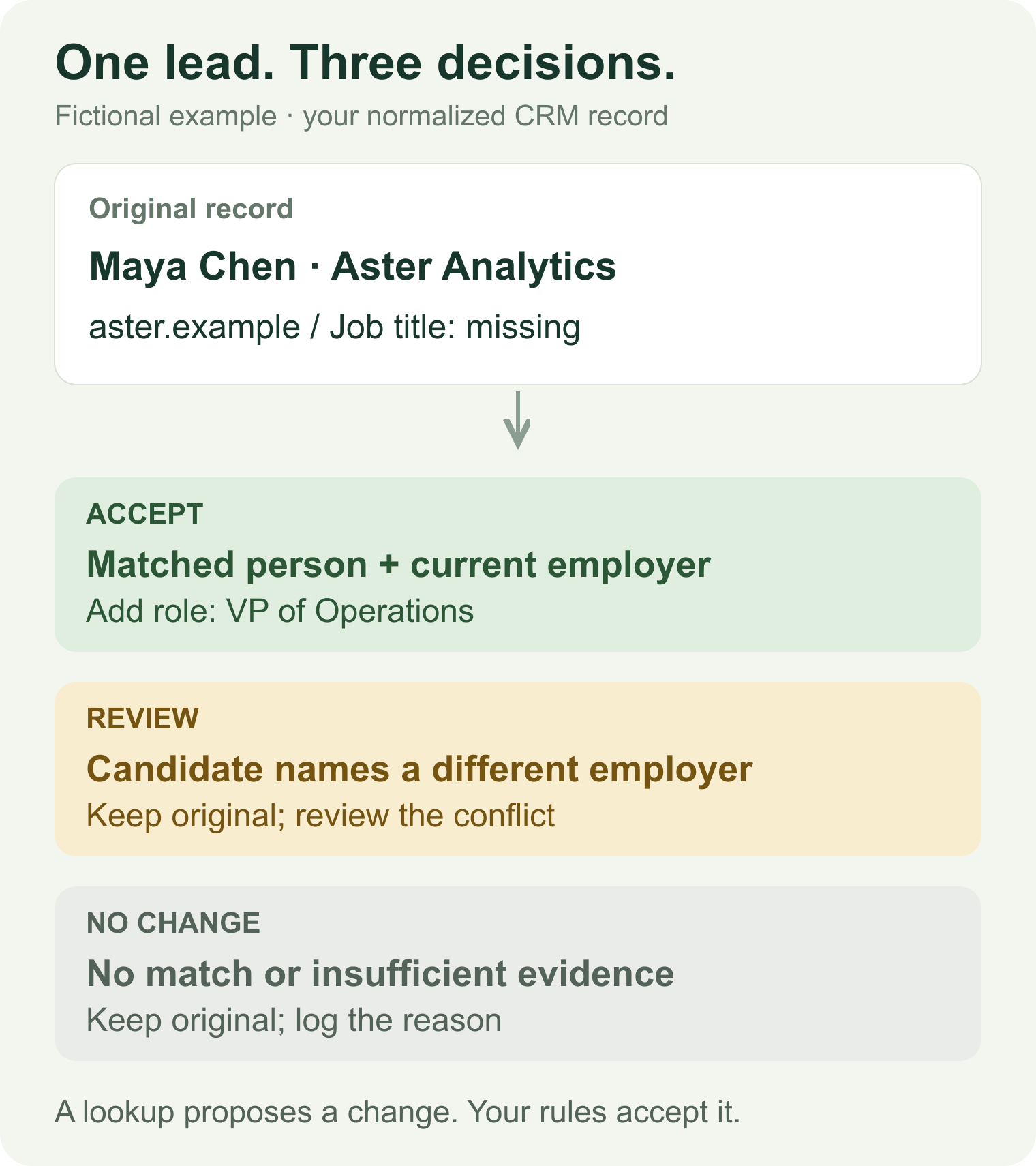
Illustration: one lead can produce an accepted update, a review task, or no change.
Suppose this team routes leads by current role and employer. Its minimum usable record needs:
- A supported match to the intended person.
- A current employer consistent with the lead's account—or a reviewed explanation for the difference.
- A job title that supports routing.
- A source and retrieval time for every accepted update.
An email becomes required only when the next task is email outreach. Company headcount becomes required only when it changes qualification or routing. Choose the required fields before you buy the data.
Store retrieved_at separately from source_updated_at. Retrieving an old profile today does not make its employment data fresh. If the provider gives no update date, record that uncertainty.
Contact data enrichment becomes easier to audit when each proposed change has an old value, a candidate value, a source, and an acceptance decision. Keep the original values until those decisions are made.
How to choose lead enrichment tools
Choose a tool type for your workflow
The best lead enrichment tools for a sales rep and an engineer can be different. Start with who will use the result and where it must go.
| Your situation | Start by evaluating | Your first question |
|---|---|---|
| RevOps wants to maintain an existing CRM | CRM enrichment software | Can we protect trusted fields and control refreshes? |
| Reps need to research and contact prospects in one workspace | A sales database with enrichment | Are the data, exports, and outreach features we need included? |
| Operations needs to coordinate several services | A workflow or agent platform | Who owns matching, branching, retries, and the data bill? |
| An engineer is building a product or custom workflow | Enrichment APIs or an API access layer | Do the input, output, and charge rules fit our use case? |
A B2B lead enrichment tool should earn its place by completing your task. A long feature list gives you little guidance if it accepts the wrong input or cannot return the field that determines routing.
Compare tools by inputs, outputs, and billing
Here is a practical shortlist of B2B data enrichment tools and access options. It is organized by use case, with commercial information checked on September 23, 2026. These are documented capabilities, not a head-to-head accuracy test.
| Option | When to evaluate it | Inputs and outputs to check | Billing or access detail |
|---|---|---|---|
| Cognism | You want managed CRM enrichment | Test your CRM records against the required contact and company fields | Quote-based. CRM Enrichment is available standalone; its Data-as-a-Service API access requires a Prospecting seat. Official pricing |
| Apollo | Reps need enrichment alongside prospecting and outreach | The person endpoint accepts identifiers such as email, LinkedIn URL, or name with domain; inspect its match confidence | The endpoint documents free-account access with a work-email registration requirement. Credits depend on returned data and waterfall settings. API reference |
| Gumloop | You need agents or workflows coordinating several tools | Define the inputs, data sources, and output checks in your flow | Public pricing lists a 14-day trial, Pro starting at $37/month, and credit/orchestration charges. Price the actual flow, including data calls. Pricing |
| People Data Labs (PDL) | You need a person record for a custom application | Email, profile, phone, or supported combinations; returned professional fields depend on coverage and access | Direct API parameters include controls for match likelihood and required fields. Confirm your field bundle and plan before estimating cost. API input reference |
| Prospeo | Your task centers on contact enrichment and work emails | Email, LinkedIn URL, or name plus employer; check whether the requested contact field is returned | Its direct API documents one credit per email found. The free plan has 100 monthly credits and limited API access, with no CSV enrichment. API · Plans |
| Glasser | You want access to provider endpoints through one key and workspace balance | Inspect each endpoint's own schema; select a provider based on the fields you need | Our inspected Prospeo person endpoint listed $0.02695/call; PDL person enrichment listed $0.30/call. Both listed $0 for no match. These are Glasser prices for different operations. Inspect the current contract before calling. How billing works |
For sales lead enrichment tools, an existing CRM integration can save work on field mapping and maintenance. With API-based contact enrichment tools, you gain control over the workflow and take responsibility for those decisions.
If you are comparing managed lead enrichment services, ask for a small sample using your actual required fields. Agree on how disputed records will be reviewed before comparing quotes.
A useful evaluation sheet has one row per lead and columns for the original input, matched identity, requested fields, conflicts, final decision, and charge. Start with a small mix of ordinary records, recent job changes, and weak inputs. Use the same acceptance rules for every candidate.
That will tell you more than a generic “best data enrichment tools” ranking. A provider that returns fewer records may still produce more records your team can use.
How to automate lead enrichment for your CRM
Define required fields and match the right person
For CRM lead enrichment, use the Maya example to set a concrete acceptance rule: a supported identity match, a reviewed employer, and a usable job title. Then build the workflow around that rule.
Before each lookup:
- Load the current CRM record using its stable record ID.
- Normalize identifiers and check for duplicates.
- Skip the lookup if the required fields already meet your freshness policy.
- Send the strongest supported identifiers to the selected endpoint.
A second identifier can strengthen matching, but contradictory identifiers need attention. An old employer and a current profile URL may point to a job change. Keep that possibility visible instead of forcing every field to agree.
Enrich missing fields and resolve conflicting results
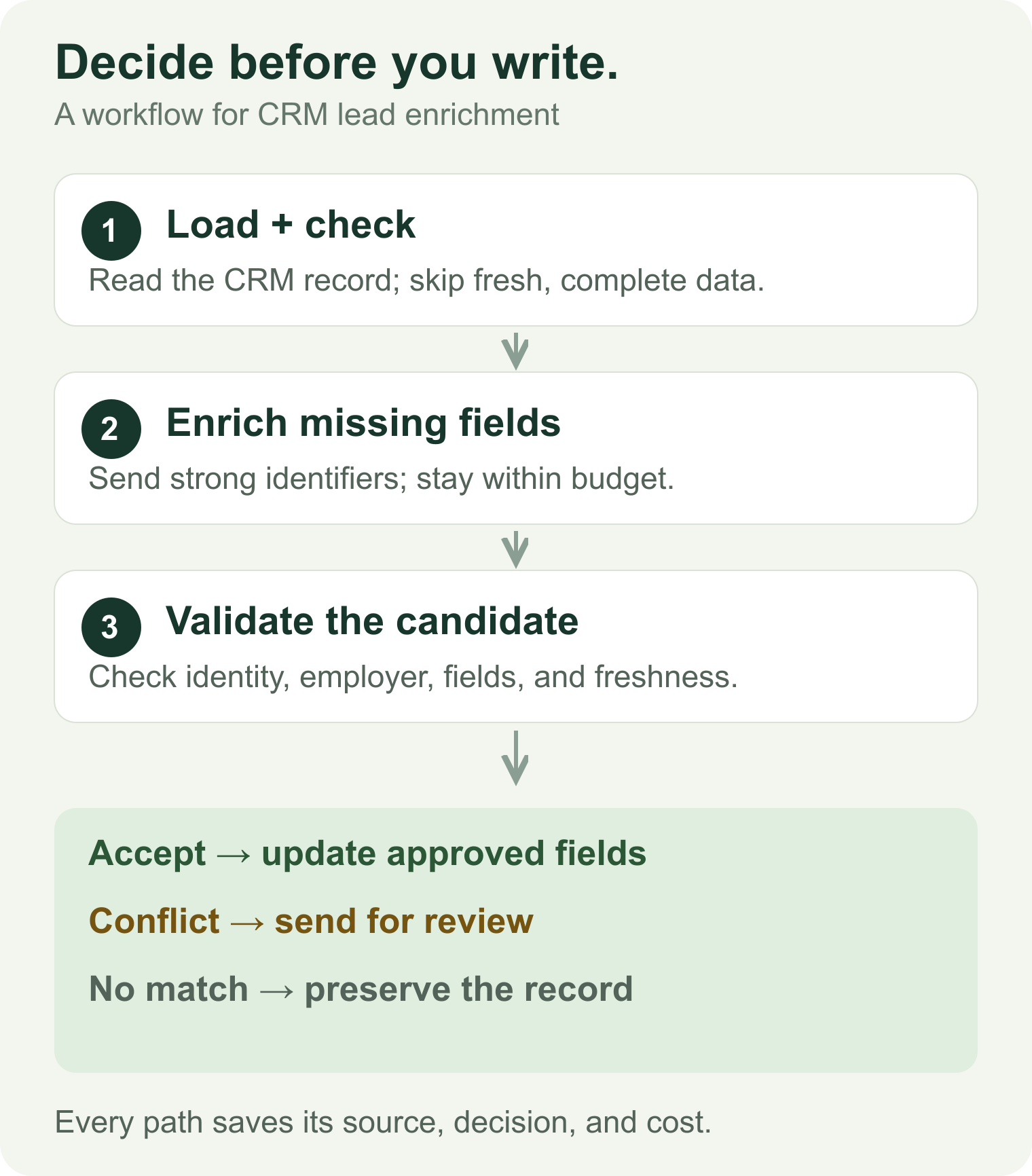
The write-back decision belongs after identity and field checks.
For CRM contact enrichment, use three explicit outcomes:
| Outcome | Example | Write-back rule |
|---|---|---|
| Accept | The person matches; a missing role is returned with sufficient support | Fill the allowed field and save its source |
| Review | The same person appears at a different employer | Preserve the original; store the candidate and reason for review |
| No change | No match, an empty field, or insufficient identity evidence | Leave the original value intact; record why the update was skipped |
A contact enrichment software setting called “overwrite” can have a large effect. Protect manually verified fields by default. A blank response should never erase a known value.
Set retry limits and write accepted changes to your CRM
In your own CRM or automation workflow, set a budget per record, a maximum number of provider attempts, and a freshness window. These are rules you implement for this workflow. Once your required fields are satisfied, stop.
Separate a lost network response from a new enrichment attempt. For a Glasser request whose outcome is unclear, retry the same request with the same idempotency key. A new provider attempt needs a new key and a fresh budget check. Glasser's run documentation describes this behavior.
Before writing, reload the CRM record and check that it has not changed since the workflow started. Update only approved fields on the existing record ID. Save the decision, source, retrieval time, and charge alongside the change.
These rules prevent a delayed enrichment job from overwriting a correction a sales rep made five minutes earlier.
Apply the workflow in n8n or an AI agent
For lead enrichment in n8n, start with Manual Trigger → Edit Fields → HTTP Request → result checks → CRM update or review queue. Run the first version with CRM writes disabled.
The following n8n configuration is an implementation example assembled from n8n's HTTP Request documentation and Glasser's API reference. It is not an official Glasser integration guide. The Glasser requests follow its published documentation and our saved endpoint contract; the complete n8n-to-CRM workflow has not been tested end to end.
1. Inspect the endpoint. In an HTTP Request node, use POST with the documented path:
/v1/endpoints/inspect
Use the HTTP API base URL confirmed by Glasser when building the full node URL. The API reference reviewed for this article does not establish a production base URL, so the path above is not a complete request URL. Store Authorization: Bearer YOUR_GLASSER_KEY in an n8n Header Auth credential. Set the body content type to JSON and send:
{
  "provider": "pdl",
  "endpoint": "/v5/person/enrich"
}
Check input_schema, endpoint_version, price, run_mode, and timeout_ms. Our September 23 inspection returned version 6, a $0.30 call price, a $0 no-result clause, and a 30-second timeout for this synchronous endpoint. Use the current inspection when you build your request. Selecting a version does not lock the price: a new run uses the price at admission. Inspect reference
2. Configure the enrichment request. Use another HTTP Request node with POST to the documented /v1/runs path on the same confirmed HTTP API base URL, the same credential, and the required Idempotency-Key header. Glasser recommends a caller-generated UUID. Save the key with the request so a retry can reuse both. Run request reference
The JSON body for the inspected version is:
{
  "provider": "pdl",
  "endpoint": "/v5/person/enrich",
  "endpoint_version": 6,
  "input": {
    "profile": "REPLACE_WITH_YOUR_CONTACTS_PROFILE_URL"
  }
}
Replace the profile placeholder with a contact you are authorized to process. Glasser's inspect documentation instructs callers to set the HTTP client timeout above the endpoint's published timeout_ms; use that value when configuring the n8n node. Executing this node can charge your workspace.
Use the schema returned by Glasser. PDL's direct API has additional parameters, such as required and min_likelihood, that were not exposed in this inspected Glasser input schema. Adding unsupported parameters will not add those features.
3. Check the result before mapping fields. Keep the original CRM record separate from the response. Inspect:
status: the run's lifecycle state.provider_response.http_status: the provider's HTTP status, whenprovider_responseis present. For aCOMPLETEDrun, a non-2xx response body is inprovider_response.error.output: the provider's 2xx response body; it can be null for an empty body.failure: the failure details when the run isFAILED.charge_usdandcharge_basis: the reported charge and the clause used to calculate it. Keep the amount as an exact decimal when adding costs.
COMPLETED means the provider answered. It can still carry a not-found response. Route provider errors, empty results, and ambiguous records away from the CRM update path. Run result reference
4. Map and review one record. Inspect the actual output before selecting fields in n8n. Use an Edit Fields node to keep only the proposed CRM changes, then apply the acceptance rules above. Send conflicts to your review queue. Enable CRM updates only after the field mapping and branches behave as intended.
The n8n HTTP Request documentation covers Header Auth, JSON bodies, and request options. Your CRM's update operation supplies the final write-back step.
For AI lead enrichment, give the agent the same limits: permitted fields, supported identifiers, a budget, and a review rule. It can select an endpoint or classify a sourced job title into a department. Keep inferred categories separate from retrieved facts. An empty email field should remain empty until a source supplies an address.
Glasser provides the data-call layer in this example. Identity checks, field merging, schedules, and CRM updates remain part of your workflow.
How to measure lead enrichment quality and cost
Separate match rate, field completeness, and usable records
A successful API response is an intermediate result. Measure what happened after your acceptance rules ran.
| Metric | Calculation | What it tells you |
|---|---|---|
| Provider match rate | Inputs with a returned match ÷ unique attempted leads | How often the provider returns a candidate |
| Required-field completeness | Matched records containing every required field ÷ matched records | Whether the returned fields support your task |
| Usable-record rate | Unique leads passing identity and field checks ÷ unique attempted leads | How much of the starting list you can act on |
| Cost per usable lead | Enrichment and required verification charges ÷ usable leads | What you paid for each accepted result |
Track employer conflicts, missing dates, and uncertain email verdicts separately. A high match rate can hide old employment information or a weak identity match.
Use a review sample to investigate correctness. Calling your acceptance rate “accuracy” would imply that the accepted facts had been independently checked.
Calculate cost per usable lead
Consider this hypothetical batch. It is an arithmetic example, not a product benchmark or quote.
| Batch result | Count |
|---|---|
| Unique leads attempted | 100 |
| Records returned by the provider | 85 |
| Returned records with all required fields | 78 |
| Records accepted after identity and employer checks | 70 |
| Total enrichment and required verification charges | $14.00 |
The provider match rate is 85%. Required-field completeness is 78 ÷ 85 = 91.8%. The usable-record rate is 70%.
Cost per usable lead is $14 ÷ 70 = $0.20. Dividing by all 100 inputs would give $0.14, but that hides the cost of the 30 leads you still cannot use. With zero usable records, report the spend and zero yield; a per-usable-lead cost is undefined.
Include paid retries and any second-provider lookups in the numerator. Show subscription allocation, workflow infrastructure, and human review costs separately if you want a broader operating cost. Keep the cost definition consistent across tools.
For usage-based lead enrichment software, save the charge returned by each call. Check the endpoint's no-result and failure clauses rather than assuming every unsuccessful attempt is free.
Lead enrichment FAQs
Can you enrich leads for free?
Free data enrichment tools can help you test coverage, but check the exact task your free access permits. Prospeo's free-plan documentation lists 100 credits per month and limited API access; bulk processing and integrations are excluded. Its plan comparison also excludes CSV enrichment from the free plan.
A free single-record test can therefore be useful without proving that a recurring CRM workflow will be free. Confirm the credit reset, API access, export rights, and required integrations before choosing a plan. Provider-direct allowances do not transfer to Glasser calls.
Can you enrich a lead with only a name?
Treat a name-only record as a request for more context. Add a company domain, profile URL, email, or another identifier supported by your chosen endpoint. A common name is too weak a basis for automatically replacing contact details.
How often should you refresh enriched lead data?
Tie refreshes to an action and the field's sensitivity to change. Review a current employer or work email before important outreach. Recheck a company attribute when it affects routing or qualification. Skip a paid refresh when the existing record still meets your agreed freshness window.
For a first rollout, define one task, one required-field set, and one review queue. Inspect every proposed update in a small batch before enabling automatic writes. Scale when you can explain both why each change was accepted and what it cost.
Related posts

9 min read
LinkedIn Email Finder: Choose a Tool and Find the Right Work Email
Have a LinkedIn profile but need a work email? Compare tools and free limits, handle bulk lists, and check whether the address matches the current employer.

8 min read
Free People Search API: Find Candidates Before Paying for Contact Data
Find out what a free people search API returns before paying. Compare profile previews, enrichment, and contact-reveal costs for B2B prospecting.
Make your agent
work with real data.
Search, inspect, and run data APIs through one Glasser key. Turn your next question into a result you can use.
Get started with Glasser