


Glasser Team9 min read
LinkedIn Email Finder: Choose a Tool and Find the Right Work Email
Have a LinkedIn profile but need a work email? Compare tools and free limits, handle bulk lists, and check whether the address matches the current employer.

You have the right LinkedIn profile. You still need a work email—and a reason to believe it belongs to that person at their current company.
For one contact, start with the information the person has shared. For a list of profile URLs, compare tools that accept that input directly. For a name and employer, use a finder that supports both fields. The best starting point depends on the identifiers you already have.
The shortlist below covers Prospeo, Hunter, Apollo, and a Glasser API route. Commercial details were checked on September 23, 2026. The comparison uses official documentation; it does not claim a measured accuracy winner.
Choose a method for the information you have
A LinkedIn email finder uses a profile identifier or other professional details to look for a corresponding address. Finding a work email through a data provider does not establish that it is the private email used to register the LinkedIn account.
| Your starting point | First method to try | If it returns nothing |
|---|---|---|
| One visible LinkedIn profile | Check the profile's Contact info and any linked professional website | Use a finder that accepts the profile identifier, or ask the person for a preferred contact channel |
| One or more profile URLs | A URL-based lookup, then an identity and employer check | Preserve the URL; record no match instead of guessing an address |
| Full name and current company domain | A name-and-company email finder | Add a profile identifier or confirm the employer |
| A CSV of profiles | A paid bulk feature or your own API workflow | First test a few rows and confirm export/API access |
| An existing email address | An email verifier | Resolve invalid or uncertain results; another finder call may be unnecessary |
How to find emails on LinkedIn manually
Open the person's profile and look for Contact info. Check any email or professional website they have chosen to make visible. Confirm that the profile and current employer match your intended contact before saving an address.
The available information depends on the member's settings and your relationship to them. LinkedIn documents member-controlled email visibility. A missing address is a normal outcome.
If you follow a link to a company biography or personal website, record where the address came from. A general company inbox may be useful, but it should stay labeled as a shared address. It is not proof that you found the individual's inbox.
Compare LinkedIn email finder tools and free access
Choose a tool for its input support and usable output before looking at the size of its database.
| Option | Suitable starting input | Free access and paid boundary | Practical selection point |
|---|---|---|---|
| Prospeo direct | LinkedIn URL, email, or a person's name plus employer | 100 credits/month; limited API access. Free plan excludes CSV enrichment and integrations | A useful candidate when profile URLs are your primary input |
| Hunter direct | LinkedIn handle, or name with domain/company | 50 shared credits/month. Finding an email costs 1 credit; a separate verification costs 0.5 | Useful for mixing profile-based and name/domain searches |
| Apollo direct | Person identifiers including LinkedIn URL, email, or name/company context | Its person enrichment API permits free accounts registered with a work email; returned data and enrichment settings determine credits | Consider it if Apollo is already part of the sales workflow |
| Glasser → Prospeo | Inputs allowed by the inspected Glasser person endpoint | Inspected price: $0.02695/call, with a $0 no-result clause; provider-direct free credits do not apply | A paid API route for an application using a Glasser key and balance |
Sources: Prospeo API, Prospeo plans, Hunter API, Hunter pricing, Apollo person enrichment, and Glasser's saved September 23 endpoint inspection. Glasser explains endpoint pricing here.
Read “free” at the feature level
A free LinkedIn email finder can be enough for a small evaluation. It may not include the upload, export, integration, or throughput needed for your final workflow. For Prospeo, the absence of free CSV enrichment matters if your starting asset is a spreadsheet rather than a single profile.
Hunter's 50 credits form a shared pool. If every attempt finds an email and you separately verify each one, 30 finds plus 30 verifications consume 45 credits. That is a planning calculation, not a measured result. A product may also verify addresses during finding; check that result before buying a redundant second verification.
Apollo's API access statement does not specify an unlimited free quota. Check the account's current credit balance and enabled enrichment features. Its direct documentation distinguishes normal enrichment from waterfall settings, which can change the charges.
For a strict zero-budget trial, record whether signup asks for a card, which operations the free key permits, and what happens at the usage limit. These conditions were not uniformly established for every option in our source review. Do not enable a paid feature simply to make the first test work.
An email finder by name needs context
“Alex Morgan” is not enough to choose confidently between people who share a name. Supply the current company domain where the tool accepts it. Prospeo's name-based path requires employer information; Hunter's direct finder supports name plus domain/company or a LinkedIn handle.
A LinkedIn URL can help resolve identity, but it does not guarantee that a provider has a current email. Use the employer returned with the address as another check.
Build a LinkedIn-to-email workflow you can inspect
Start with five or ten records you are entitled to process. Include a clear profile, a common name, a recent job change, and a record with weak company information. The purpose is to check your workflow before you send a large list through it.
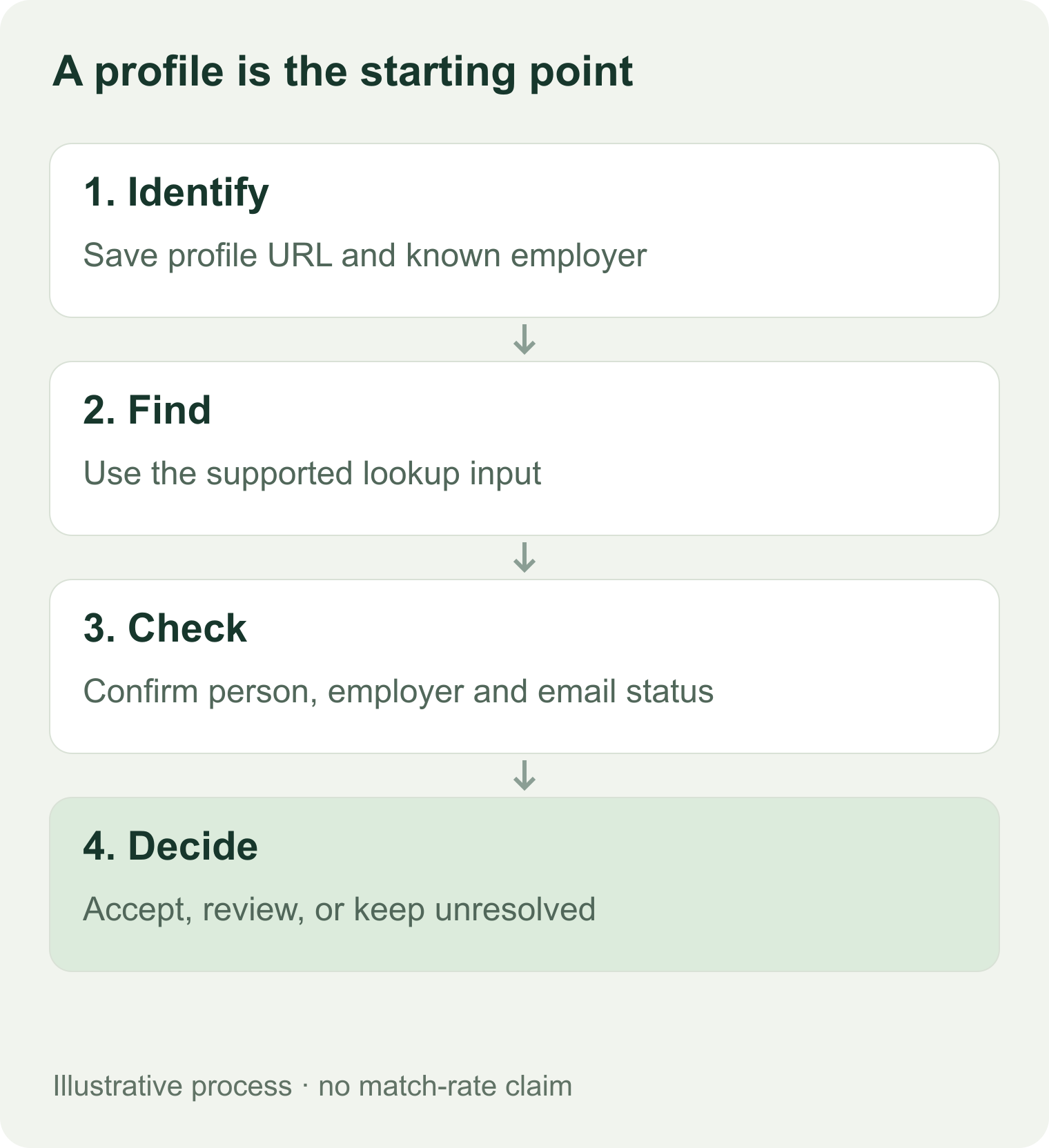
An address must pass both identity and email checks. This is an illustrative workflow, not a product screenshot.
- Create a stable input row. Save your own row ID, profile URL, known full name, and known employer. Keep the raw input for review.
- Choose the matching lookup. Use a URL-capable endpoint for profile URLs. Use name plus company only when those are your supported inputs.
- Save the candidate separately. Keep returned email, identity, employer, source, lookup time, and charge alongside the original record.
- Check the current employer. A valid address at a former company can still be the wrong address for this task.
- Read the verification result. Preserve the provider's original status and date. Perform a separate check only when you need it.
- Export accepted rows. Keep no-match, conflict, and uncertain rows in separate review groups.
Use the downloadable evaluation sheet to keep those decisions visible. It contains column headers only and no personal data.
If you use Glasser
Our read-only inspection confirmed the Prospeo /enrich-person endpoint, version 2, with linkedin_url among its supported inputs. It also confirmed Hunter's /v2/email-verifier for a separate check of an existing email. These are distinct operations with distinct prices.
Follow Glasser's documented sequence: select an endpoint, inspect its contract, and build the request from that contract. Native provider parameters should not be assumed to pass through unchanged. The saved Glasser contracts did not publish a reliable output schema, so inspect an actual response before implementing field mapping.
The row storage, employer checks, batching, and export steps above are application logic you implement. This article does not claim that Glasser supplies a LinkedIn browser extension or a CSV upload screen. No live lookup was run for this guide.
Decide which returned emails are usable
Consider this fictional example: Jordan Lee's profile shows Northstar Labs, but the lookup returns a work address at an earlier employer. Even if an email verifier accepts that mailbox, the record should go to review before outreach.
Use two independent decisions: does this record identify the intended person, and is this contact channel suitable now?
| Result | What it establishes | Suggested action |
|---|---|---|
| Current employer matches; address has a satisfactory verification result | The record passes your initial checks | Accept with source and check time; delivery is still not guaranteed |
| Address belongs to a former employer | A possible historical contact | Hold for review; look for current-employer evidence |
| Catch-all / accept-all | The domain accepts checks broadly; this mailbox may remain uncertain | Keep in a separate risk group |
| Unknown | The verifier could not reach a reliable conclusion | Leave unresolved; use a bounded later check if useful |
| No email found | This lookup did not supply an address | Record no match; do not manufacture a likely pattern |
| Shared inbox | A team contact channel | Label it as shared; do not present it as a personal address |
These are recommended business rules. Provider labels differ, so map the original statuses rather than relying on a score alone. Hunter, for example, documents accept_all as a reason SMTP checks may produce false positives. Verifier reference
A finder hit rate, verification pass rate, and actual delivery rate have different denominators. Reporting one as another will hide the failure that matters to a sales team.
Calculate cost per usable work email
Count unique accepted addresses after identity, employer, and verification checks. Put every billable lookup and verification in the numerator.
Here is an illustrative Glasser budget using the inspected prices, assuming the finder produces 60 billable matches from 100 unique profiles and all 60 receive a separate billable Hunter verification:
| Item | Calculation | Cost |
|---|---|---|
| Prospeo matches | 60 × $0.02695 | $1.617 |
| Hunter verifications | 60 × $0.01225 | $0.735 |
| Total | $1.617 + $0.735 | $2.352 |
| If 45 unique emails pass your acceptance rules | $2.352 ÷ 45 | About $0.0523 per usable email |
The 60 matches and 45 accepted emails are assumptions, not observed provider performance. This example excludes tax, application infrastructure, manual review, and any extra calls. An invalid verification verdict can still be a billable answer. Read each Glasser endpoint's charge clauses instead of applying the direct provider's credit policy to it.
Store exact decimal amounts when adding call charges. Keep unsuccessful lookups and rejected candidates in the evaluation file; removing them would make the provider look more economical than the full workflow actually was.
LinkedIn email lookup questions
Can I get someone's private email from LinkedIn?
The member controls visibility of information in their profile. The tools here can look for contact data they hold; they do not guarantee access to a hidden registration email. When no appropriate address is available, asking for a preferred contact channel is a valid outcome.
What is the best LinkedIn email finder tool for a bulk list?
Shortlist options that accept your input format and permit the required upload, API, and export operations on your plan. Test the same small set before purchasing bulk access. Prospeo's free plan is unsuitable for evaluating its CSV enrichment feature because that feature is excluded.
Can I find an email from a LinkedIn profile without an extension?
Yes. You can check shared contact information manually or use a provider's supported API input. Prospeo accepts LinkedIn URLs; Hunter documents a LinkedIn handle input. A server-side lookup and a browser extension have different setup and permissions.
Should I verify every found address again?
Check what the finder already returns, when it was checked, and whether that evidence meets your task. A recent, documented verification may make an immediate repeat unnecessary. For an old record or an uncertain result, a fresh check can add useful information. It still cannot confirm that the person wants outreach or that a future message will reach the inbox.
For the first batch, success means you can explain why each accepted email belongs to the intended person at the intended employer. Scale that process once the decisions and costs are visible.
Related posts

8 min read
Free Email Verification API: Compare Options and Handle Every Result
Compare free email verification API limits and costs. Learn how to handle valid, invalid, catch-all, and unknown results in signup forms and list cleaning.

14 min read
Lead Enrichment: How to Enrich B2B Leads and Choose the Right Tools
Turn incomplete B2B leads into usable CRM records. Compare enrichment tools, resolve conflicting data, and calculate cost per usable lead.
Make your agent
work with real data.
Search, inspect, and run data APIs through one Glasser key. Turn your next question into a result you can use.
Get started with Glasser