
Glasser Team9 min readUpdated
Jev AI Explained: How It Works and When to Use It
Understand TypeSafe Jev, compare its role with LLMs, explore its inputs and outputs, and learn where it fits in a Glasser data workflow.

TL;DR
- Jev AI is TypeSafe's System One model for structured decisions. Give it context and a specific question; get a choice, a rubric-based score, or a probability that a statement is true.
- Use it for bounded judgments: routing requests, screening retrieved information, or choosing among known options. Use generative models for writing and code for exact calculations.
- Start with the input/output examples. Clear criteria and relevant context determine whether a question is useful.
- Use Jev directly through Glasser. Inspect TypeSafe's endpoint, submit your context and questions, and use the structured answers in your workflow. Your existing Glasser key and balance cover access.
What Is Jev AI, and Why Does It Matter?
Jev is a model from TypeSafe that evaluates questions against a supplied state: the message, document, or structured data you want it to assess. TypeSafe calls this a System One model, designed for quick, narrowly defined judgments whose answers feed directly into software. TypeSafe introduction.
Consider a support workflow. Before writing a reply, the application needs to determine which team owns a ticket, whether it is urgent, and whether it needs a person to review it. These decisions have defined outputs. A selected queue can route the ticket; a relevance probability can determine whether to retain a document.
Jev can evaluate several independent questions against the same state in one request. Questions that depend on a previous answer still need the application to manage that dependency. This distinction matters when designing an agent: combine independent checks, then let code decide what happens next. Question evaluation.
TypeSafe describes its training approach as reinforcement learning for calibrated decisions (RLCD). The goal is for probabilities to reflect how often outcomes occur across many predictions. A probability expresses uncertainty; it does not guarantee that an individual answer is correct. TypeSafe AI primer.
Jev vs. Other AI Models: Which Should You Use?
Choose a model by the work required at each step. An agent may need a generated plan, a bounded routing decision, and a written explanation within the same task.
| What the step needs | A suitable starting point | Example |
|---|---|---|
| A judgment among defined options | Jev | Choose the queue that should handle a request |
| New text, code, or an explanation | A general-purpose generative LLM | Write a report using retrieved data |
| Analysis across several dependent steps | A reasoning-capable LLM | Investigate conflicting evidence and develop a plan |
| An exact calculation or known mapping | Code | Enforce a budget or copy a domain into a request |
General-purpose and reasoning-capable LLMs overlap, and some support structured outputs and tool calling. The useful comparison is whether a model handles your specific decision accurately, with acceptable latency and cost. Jev's role is particularly relevant when an agent repeatedly makes small classification or routing decisions. LangChain's Jev integration guide.
For example, a generative model can interpret a research request and prepare the final report. Jev could choose among candidate data endpoints during that workflow. Code can validate the selection and submit the request. This gives each stage a clear job and lets the application move directly from a decision to its next data call.
When Should You Use Jev?
Look for a recurring semantic judgment with a clear answer space. These are practical starting points:
| Task | Context to provide | Decision | What your application does next |
|---|---|---|---|
| Request routing | A user message and descriptions of available queues | Choose a queue | Assign the request |
| Search-result screening | A query and a candidate passage | Estimate relevance | Keep or discard the passage |
| Lead prioritization | A company record and explicit fit criteria | Score fit | Order a review queue |
| API selection | A task and candidate endpoint descriptions | Choose a candidate | Inspect its request contract |
Treat these as application designs. Their quality depends on the context, the criteria, and the decisions your workflow actually needs.
For a first implementation, write one direct question and define what each answer means. Include a fallback such as none_fit when the available options may be incomplete. Keep exact arithmetic, date comparisons, and copying known values in code. Use a generative model when the task requires new prose or an open-ended plan. TypeSafe documents these boundaries in its Jev limitations.
Jev Inputs and Outputs: Three Simple Examples
Each example starts with context and a question. The question type determines the answer format: Choice selects an option, Score evaluates an ordered rubric, and Noul estimates whether a statement is true.

The following JSON snippets show the input and an illustrative answer for each question type. Output values are invented for explanation; response envelopes and some fields are omitted.
Choice: Route a Request
Define the queues and what belongs in each one. A Choice answer identifies the selected option and includes probabilities across the options. Choice documentation.
Input · choice-input.json
{
  "state": "I was charged twice for the same order.",
  "questions": {
    "queue": {
      "type": "choice",
      "instructions": "Which queue should handle this request?",
      "criteria": {
        "billing": "Charges and payments",
        "technical": "Product errors",
        "other": "Requests outside these categories"
      }
    }
  }
}
Illustrative output · choice-output.json
{
  "choice": "billing",
  "probabilities": {
    "billing": 0.95,
    "technical": 0.01,
    "other": 0.04
  }
}
Here, the application has a queue identifier it can use directly. Choice also returns confidence, a summary of the probability distribution's concentration; it is omitted from this abbreviated display.
Score: Rate a Review Against a Rubric
Use Score when the answers have an order. Define the levels before interpreting the number. Score documentation.
Input · score-input.json
{
  "state": "Search is fast, but exports frequently lose columns.",
  "questions": {
    "sentiment": {
      "type": "score",
      "instructions": "How positive is this review overall?",
      "criteria": [
        "Negative: criticism dominates",
        "Mixed: meaningful praise and criticism",
        "Positive: praise dominates"
      ]
    }
  }
}
Illustrative output · score-output.json
{
  "score": 0.7,
  "probabilities": {
    "0": 0.4,
    "1": 0.5,
    "2": 0.1
  }
}
The score lies on the defined 0–2 scale. A value of 0.7 places the review between the negative and mixed levels. The distribution shows how the model weighs the rubric levels. Score also includes confidence.
Noul: Check Whether a Result Is Relevant
Use Noul for a proposition that can be true or false. Its output is a value from 0 to 1 representing the model's probability that the proposition is true. Noul documentation.
Input · noul-input.json
{
  "state": {
    "query": "Battery recycling technologies",
    "passage": "A process for recovering lithium from used batteries."
  },
  "questions": {
    "relevant": {
      "type": "noul",
      "instructions": "Does the passage describe a battery recycling technology?"
    }
  }
}
Illustrative output · noul-output.json
{
  "noul": 0.96
}
Your application can compare that value with a relevance threshold. Noul has no separate confidence field. For Choice and Score, confidence summarizes the distribution; it should not be read as a measured accuracy rate. Select thresholds using examples from your own task. Understanding confidence.
How to Use Jev with Glasser
Jev is integrated into Glasser, so your agent can call it directly through Glasser to select, score, or check your data. Tell your agent what you need and how to judge a good result. Your agent can gather the data, call Jev, and organize the results within the same Glasser workflow.
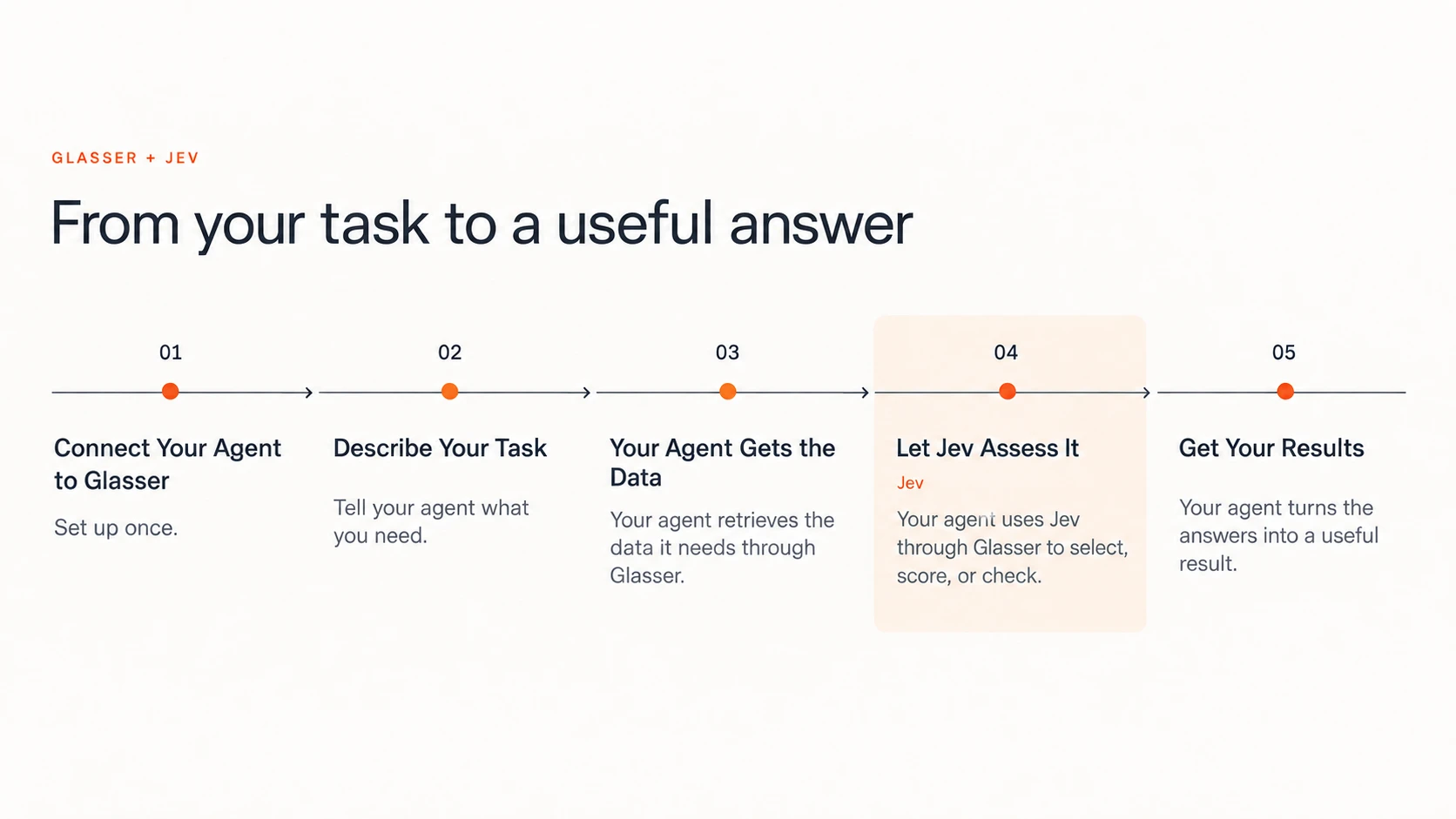
1. Connect Your Agent to Glasser
Open Glasser. In an agent that can run shell commands, paste this setup instruction into its chat:
set up https://glasser.ai/SKILL.md
Follow the browser login flow, match the displayed code, and approve the connection. If your agent is already connected to Glasser, you can go straight to the Jev request. Glasser setup guide.
2. Describe Your Task
Describe the task, the information you want to evaluate, and what makes a result useful to you. Ask your agent to use Jev through Glasser for the assessment.
For a clear request, include:
- Your goal: what you want to find, compare, or decide.
- Your criteria: what makes an option relevant, suitable, or worth prioritizing.
- Your desired output: a ranked list, a selection, or a summary with supporting evidence.
3. Your Agent Gets the Data
Your agent retrieves the information needed for your task through Glasser. It finds suitable data sources, checks their required inputs and prices, and gathers the relevant records and source links.
4. Let Jev Assess It
Your agent calls Jev directly through Glasser to evaluate the collected information against your criteria. Jev can select an option, score how well something fits, or assess whether the information supports a statement. Your agent prepares the questions and uses the returned answers in the next step.
5. Get Your Results
Your agent organizes the assessments into the output you requested, such as a ranked list or a selection with supporting evidence. It explains the results using the source material, flags missing information, and reports the actual charges. You can review the result and refine your criteria for another pass.
Example: Find YouTube Creators Worth Contacting
Suppose you are promoting an AI video creation tool for solo creators and small marketing teams. You want a shortlist of YouTube creators who publish relevant tutorials and product reviews. Glasser can retrieve channel information and recent video data; Jev can assess how well that content fits your partnership brief.
Paste this into your connected agent:
I'm promoting an AI video creation tool for solo creators and
small marketing teams. Find English-language YouTube creators
who publish hands-on AI video tutorials or tool reviews.

Use Glasser to get their channel and recent video information,
then use Jev through Glasser to assess how well they fit.

Recommend up to three creators worth contacting, with channel
links, a short reason for each, and relevant videos to review.
The agent gathers the evidence and prepares the requests. Jev returns the fit scores and probabilities; the agent uses the linked source material to write the shortlist's explanations. The result is a set of candidates you can review for outreach.
The shortlist should apply the same brief and rubric to every candidate so the results can be compared:
| Shortlist field | Where it comes from |
|---|---|
| Creator and channel link | Channel data retrieved through Glasser |
| Content-fit score | Jev's assessment using consistent criteria based on your brief |
| Evidence of hands-on coverage | Jev's assessment, supported by the retrieved video links |
| Why the creator is relevant | The agent's explanation, grounded in the retrieved titles and descriptions |
| What to check before outreach | Missing or uncertain information, such as audience demographics or partnership availability |
Rank candidates by content fit, then review the supporting videos before deciding whom to contact. A relevant channel description is a useful signal; recent examples of the right content make the recommendation easier to assess. If fewer than three creators have enough supporting evidence, return a shorter list.
Keep the assessment tied to what was retrieved. Video titles and descriptions can suggest audience relevance, but they do not establish audience demographics, willingness to partner, or likely campaign results. Mark those as unknown when the sources do not provide them.
Glasser supplies both the YouTube data endpoints and the Jev decision endpoint. Your agent connects the steps: gather creator evidence, evaluate fit, and produce a shortlist with source links. Each data or decision Run has its own charge. Glasser workflow.
Related posts
View more
Make your agent
work with real data.
Search, inspect, and run data APIs through one Glasser key. Turn your next question into a result you can use.
Get started with Glasser