
Glasser Team7 min readUpdated
Find Candidates and Sales Leads with Your AI Agent: Glasser × Metix AI
From 66,492 profiles to 230 candidate matches, and 100,000+ companies to 1,567 target accounts. See the results and copy the prompts behind both workflows.

Hiring a machine learning engineer? Selling data infrastructure? Give your AI agent the brief and let it do the research.
In our collaboration with Metix AI, we used Glasser to turn two briefs into focused shortlists:
- Recruiting: narrow 66,492 machine learning engineer profiles to 230 matches in San Francisco listing PyTorch. Reported run cost: $0.89.
- Prospecting: narrow 100,000+ US software companies to 1,567 growing target accounts, then investigate hiring needs and relevant buyers. Reported full demonstration cost: $2.18.
Below are the results, the steps behind them, and the prompts you can copy into your agent. Counts and costs come from the original collaboration demonstration; your agent should inspect current prices before running.
Connect your agent to Metix AI
Metix AI brings the job market into your agent: 900 million talent profiles, 90 million job postings, and 30 million companies, as reported for this collaboration. Glasser connects your agent to that data.
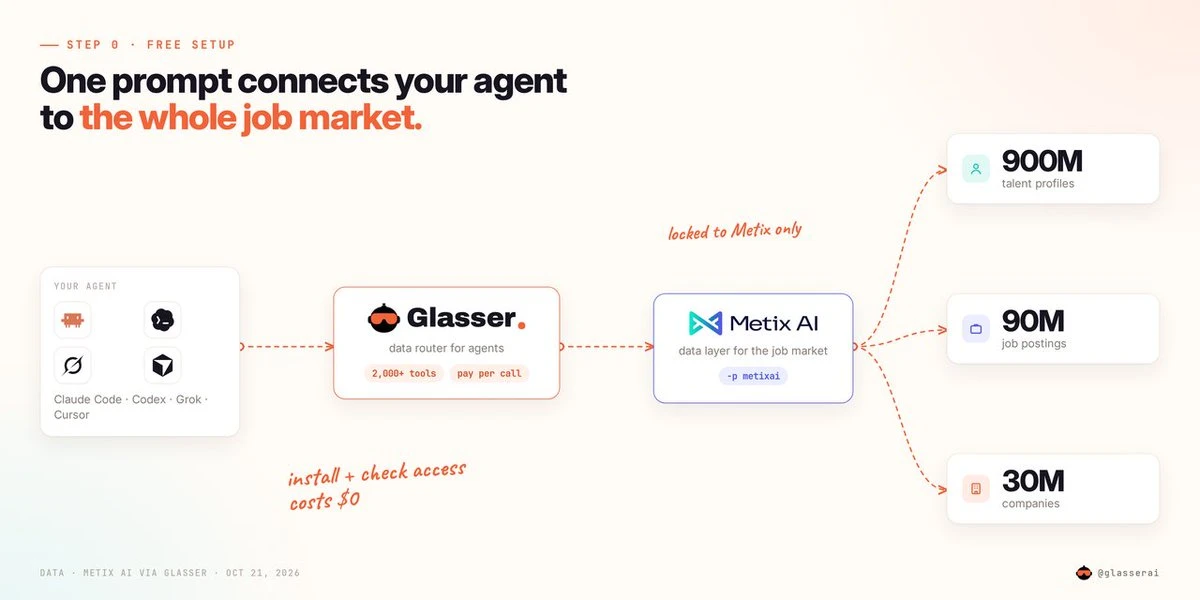
Paste this setup prompt into your agent. It checks your balance and inspects Metix's endpoints and prices without running paid data queries.
Set up Glasser by following https://glasser.ai/SKILL.md (skip if `glasser balance` already works).

Check my balance, then inspect these Metix AI endpoints:
- /v1/people/query
- /v1/jobs/query
- /v1/companies/query
- /v1/contact/probe
- /v1/contact/unlock?fields=work_email

Use -p metixai for every inspect (MCP: provider "metixai"). Summarize prices and supported inputs. Do not run paid queries or use another provider. If setup needs my sign-in or a connector, explain the next step.

Confirm whether setup and inspection succeeded; actual Metix data retrieval has not yet been tested.
Recruiting: from 66,492 profiles to 230 matches
The brief: find a machine learning engineer in San Francisco who knows PyTorch.
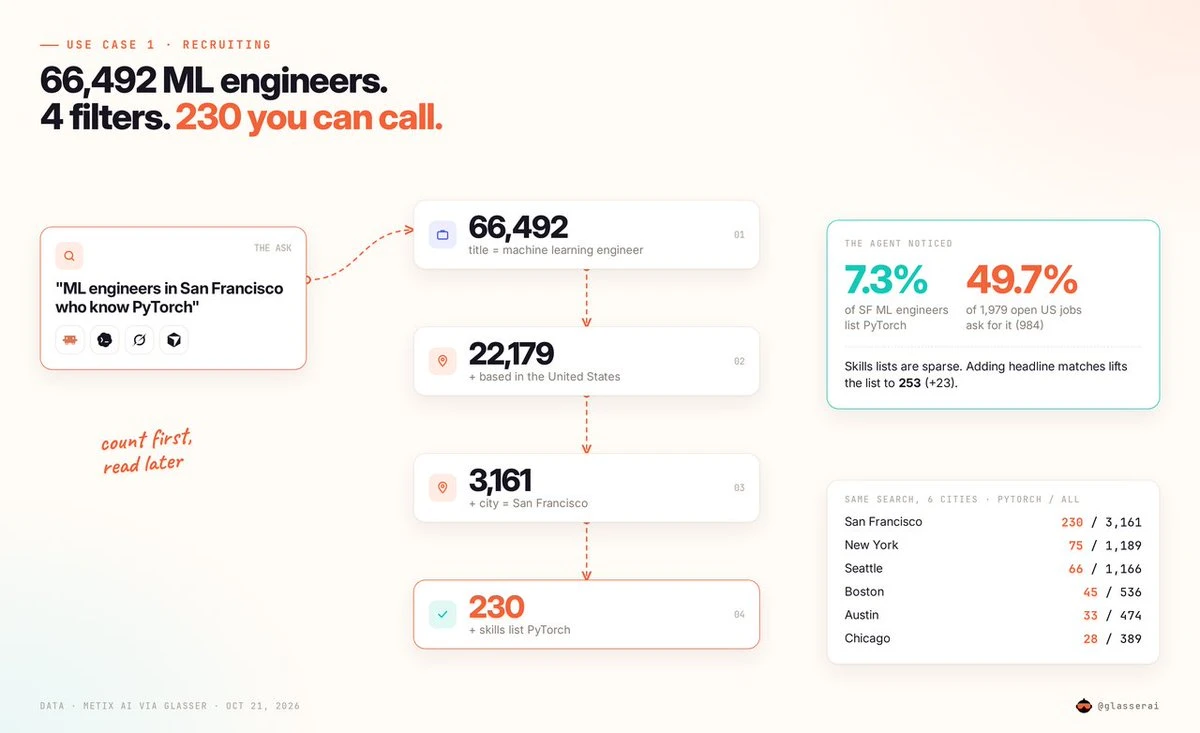
The agent worked through four cumulative filters: 66,492 profiles matching the current title, 22,179 based in the US, 3,161 in San Francisco, and 230 listing PyTorch in their skills. The demonstration cost $0.89.
Read the profiles, not just the keywords
The agent then read a sample of 25 matching profiles and prepared a shortlist with titles, companies, experience, and evidence of fit.
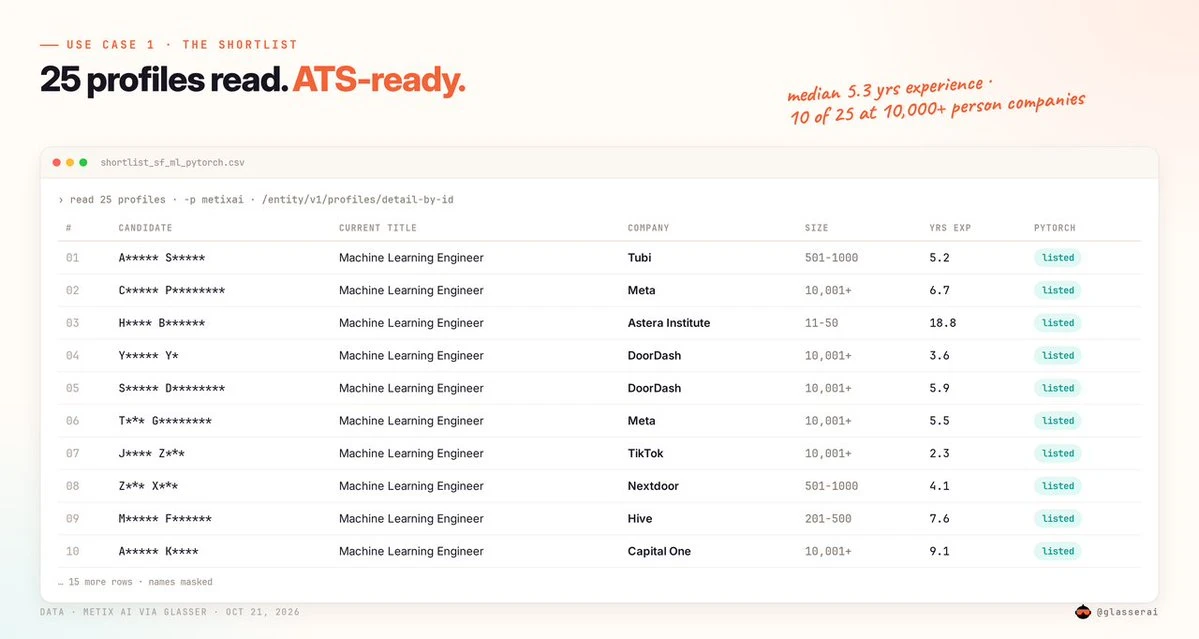
It also surfaced a useful gap: only 7.3% of those 3,161 San Francisco profiles listed PyTorch, while 984 of 1,979 open US machine learning engineer jobs—roughly half—asked for it. These are different populations, but the contrast gives you a reason to look beyond a skills field. A keyword match is a starting point; experience supplies the evidence.
Try it with your hiring brief
Replace the role, country, city, and skill below. The prompt counts first, reads up to 25 profiles, and returns a table and CSV with evidence of fit.
Set up Glasser by following https://glasser.ai/SKILL.md (skip if `glasser balance` already works).

I'm hiring:
Role: machine learning engineer
Country: United States
City: San Francisco
Skill: PyTorch

1. Use /v1/people/query with size 1. Add filters cumulatively and report each total: current_title match role, location.country eq country, location.city eq city, skills match skill.
2. If fewer than 50 match, keep the role/location filters and broaden the skill condition to skills OR headline OR experience.title. Report the additional matches; do not add overlapping counts together.
3. Retrieve up to 25 matching profiles with /entity/v1/profiles/detail-by-id. Rank this sample by relevant professional experience. Use dated evidence of the skill where available; otherwise mark skill recency unknown.
4. Provide a table and CSV: name, LinkedIn URL, current title, current company, city, experience in years if available, and evidence of fit. Do not infer skill proficiency from a keyword alone or retrieve contact details.

Use only Metix AI through Glasser. Every inspect/run must use -p metixai (MCP: provider "metixai"). Inspect before running and report prices. Proceed within $1 total; ask before exceeding it. Never switch providers or use web search as a fallback. On API failure, stop and report partial results; annotate missing data rather than inventing it.

Label the answer "Source: Metix AI via Glasser" and include actual charges and Glasser Run URLs.
Prospecting: from 100,000+ companies to relevant buyers
B2B prospecting comes down to three questions: Which company? Why now? Who should I talk to?
For this example, we started with a data infrastructure product. The full demonstration cost $2.18, including contact-related work. The reusable prompt below caps research at $2 and asks for separate approval before contact checks or unlocks.
1. Build your target account list
The agent narrowed 100,000+ US software companies to 7,176 with 50–500 employees, then to 1,567 with at least 20% year-over-year headcount growth. The starting count is capped, so we keep the +.
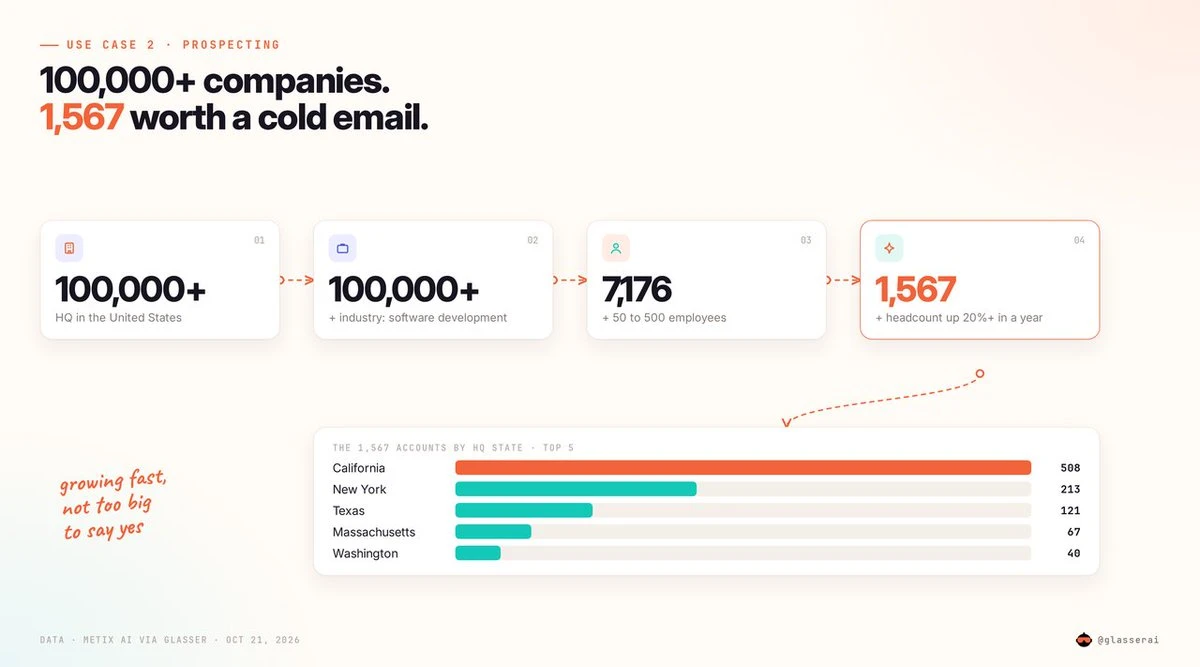
Of those final matches, 508 were in California, 213 in New York, and 121 in Texas. You now have a focused account pool to investigate.
2. Find a reason to reach out
For a data infrastructure product, data engineer hiring is a useful place to look. In a separate ten-company comparison, the agent found 15 matching open roles at Databricks, 11 at Rippling, 8 at Brex, 4 at Datadog, and 3 each at Stripe and Snowflake.
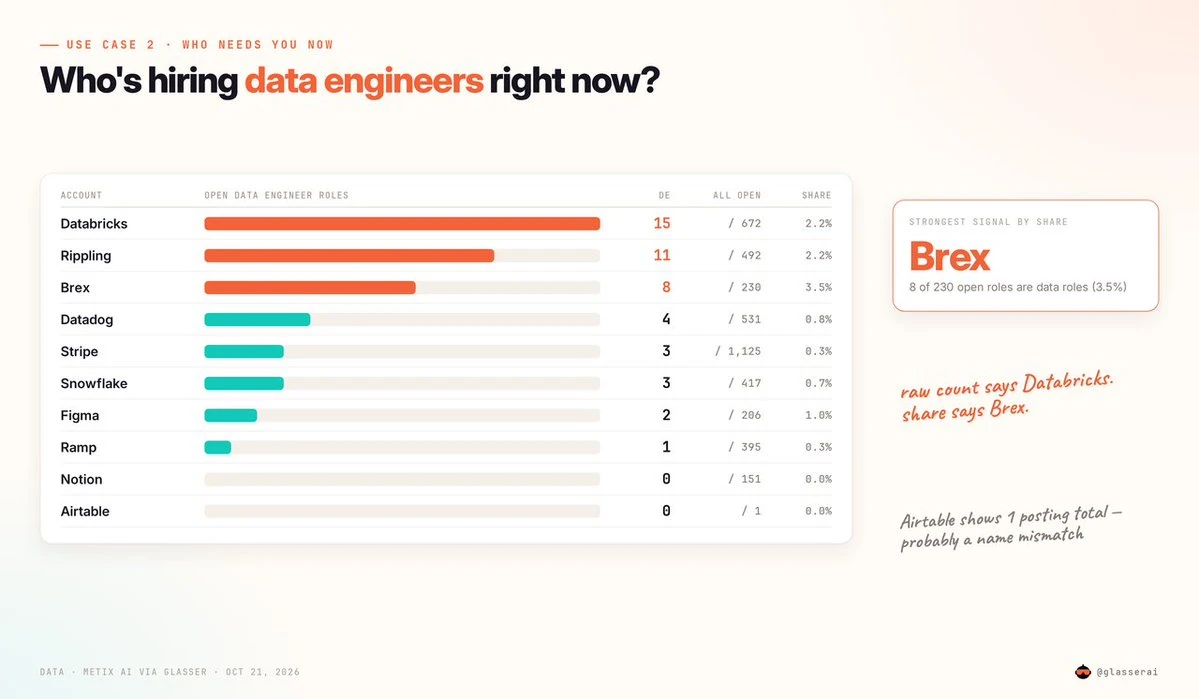
Raw counts favored Databricks; the share of all open roles highlighted Brex: 8 of 230, or about 3.5%. This named-company comparison illustrates hiring analysis separately from the earlier 50–500-employee shortlist.
The job descriptions supplied something more concrete than a company-size filter. Brex postings described work on Core Data tables and named Airflow, dbt, Snowflake, and Kafka. Rippling's Data Cloud roles mentioned ingestion, lineage, and data catalogs. Those are useful conversation hooks; hiring is a possible need signal, not proof of purchase intent.
3. Identify relevant people and check contact availability
Search selected companies for titles such as VP of Data or Head of Data Engineering. Match the company and title within the same current experience record so an old role does not send you to the wrong person.
The demonstration reviewed 26 data leaders across five companies and flagged 12 as likely decision makers. It then checked work-email availability for five people and unlocked the four available emails, at approximately $0.10 each.
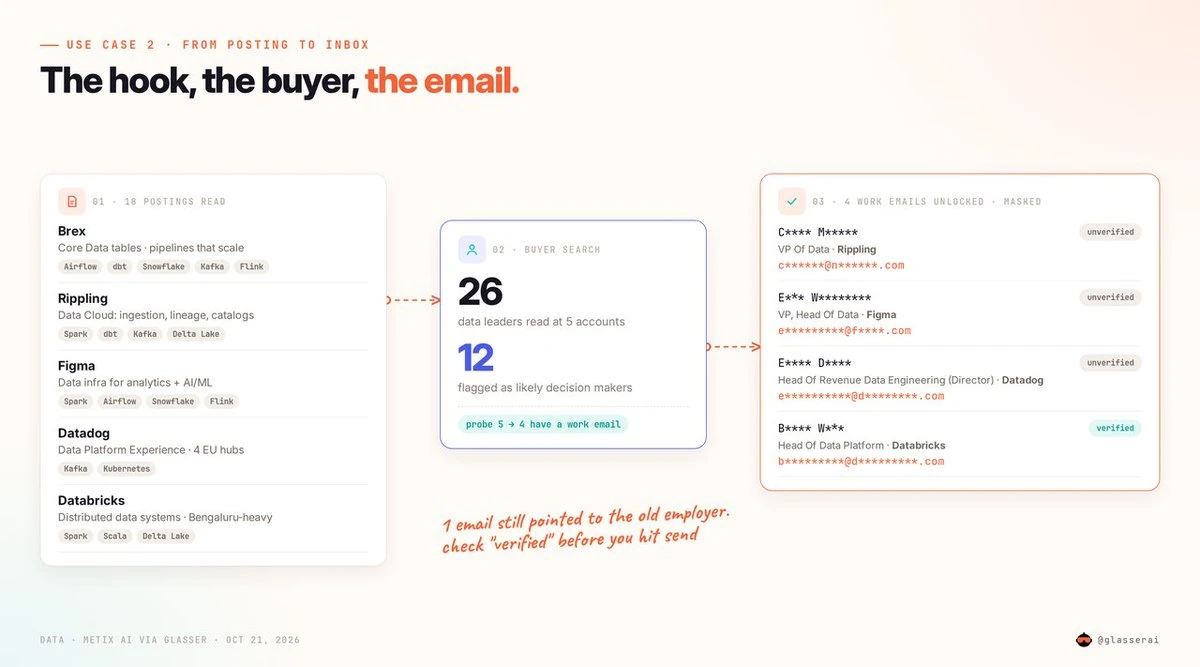
These are potential buyers to research, rather than confirmed budget owners. Select the people you want before approving contact checks and unlocks; the prompt leaves outreach to you.
Try it with your sales target
Replace the product, industry, company size, hiring signal, and buyer title. Your agent will return a researched account sample, relevant job-posting evidence, and likely contacts.
Set up Glasser by following https://glasser.ai/SKILL.md (skip if `glasser balance` already works).

I sell: data infrastructure
Target industry: software
Country: United States
Company size: 50–500 employees
Hiring signal: data engineer
Buyer title: Head of Data

1. Use /v1/companies/query with size 1. Add filters cumulatively: headquarters.country eq country, industry match industry, headcount gte 50 and lte 500, headcount_growth_yoy_pct gte 20. Show each total, preserving any capped counts.
2. Retrieve up to 10 matching companies and read them with /entity/v1/companies/detail-by-id. For each, use /v1/jobs/query to count all open jobs and open jobs whose title matches the hiring signal. Rank this sample by matching jobs / all open jobs; zero denominators are N/A.
3. For the top 5 with matching jobs, read up to 2 matching postings each using /entity/v1/jobs/detail-by-id. Extract tools and problems, with a short sourced quote and posting link. Treat hiring as a possible need signal, not proof of purchase intent.
4. Use /v1/people/query and /entity/v1/profiles/detail-by-id to find up to 2 likely buyers per company. Require company and title to match the same current experience record using has_experience and experience.is_current eq true. Show name, profile link, title, company, city, and why they may be relevant—not a confirmed budget owner.
5. Inspect /v1/contact/probe and /v1/contact/unlock?fields=work_email. Report both prices, but do not run either until I select people and approve. Do not send outreach.

Use only Metix AI through Glasser. Every inspect/run must use -p metixai (MCP: provider "metixai"). Inspect before running and report prices. Proceed within $2 total; ask before exceeding it. Never switch providers or use web search as a fallback. On API failure, stop and report partial results; annotate missing data rather than inventing it.

Label the answer "Source: Metix AI via Glasser" and include actual charges and Glasser Run URLs.
Put your own brief to work
Choose one workflow, replace the example criteria, and paste the prompt into your agent. Start with the shortlist: review the candidate evidence or account signals, then decide who deserves a closer look.
Keep the profile links, posting links, actual charges, and Glasser Run URLs in the output so you can follow each recommendation back to the data.
Related posts
View more
7 min read
Business Contact Search: How to Find People at Target Companies
Find contacts at your target companies by role and department. Compare B2B databases on the same account list before paying for contact data.

13 min read
Lead Enrichment: How to Fill Missing Data in Your CRM
Missing job titles, work emails, or company details in your CRM? Learn how to choose enrichment tools, resolve conflicts, and measure cost per usable lead.
Make your agent
work with real data.
Search, inspect, and run data APIs through one Glasser key. Turn your next question into a result you can use.
Get started with Glasser