


Glasser Team8 min read
LinkedIn Profile API Pricing: Compare Access Models and Calculate Usable-Record Cost
Compare LinkedIn profile API access models and estimate costs for 100, 1,000, or 10,000 profiles. Account for returned records, retries, and usable data.

You have 1,000 LinkedIn profile URLs and need each person's current role and employer. One pricing page quotes a monthly fee per connected account. Another quotes cents per returned person. A third discusses LinkedIn partner approval.
Those prices buy different forms of access.
There is no single LinkedIn profile API price that covers all three. First decide whether you need an authorized member's LinkedIn information, operations on a connected account, or third-party data matched to a known person. Then calculate the cost of records that actually contain your required fields.
This guide uses official access documentation, vendor pricing, and Glasser's read-only contracts checked on September 23, 2026. All batch yields below are explicitly hypothetical.
Identify the access model before comparing prices
| Access model | What you are buying | How to evaluate the price |
|---|---|---|
| Official LinkedIn member access | Approved information about an authorizing member under the granted permissions | Start with permission eligibility and app approval; do not infer a general per-profile price |
| LinkedIn partner capabilities | Access associated with a specific approved program | Confirm program eligibility and commercial terms with the relevant provider |
| Connected-account API | A third party's integration with accounts your users connect | Count connected accounts and check the supported operations and provider limits |
| Third-party person enrichment | Data a vendor holds about a person, matched using a URL or other identifier | Check per-call or per-record charges, returned fields, freshness, and no-result rules |
LinkedIn's official access guide describes open permissions and approval requirements. It identifies Sales Navigator integrations with its partner program. It does not provide a public, universal price for querying arbitrary people by LinkedIn URL.
A Sales Navigator seat price does not establish that your application can call a people-data API. Confirm the program and permissions needed for the operation you intend to build before using a seat subscription in an API budget.
Start with your input
If a person is signing in to your application and authorizing access, investigate the relevant official member permissions. If your users want supported actions through their connected accounts, investigate a connected-account integration. If you already have a list of profile URLs and need professional data for those records, evaluate the person-enrichment model.
A LinkedIn URL used as a matching identifier does not turn a third-party dataset into LinkedIn's official API. That difference should remain visible in procurement notes and product descriptions.
Compare current pricing models without mixing units
| Route | Price or commercial basis observed | What it does not establish |
|---|---|---|
| Official LinkedIn APIs | Access depends on the permission/program; no universal profile-lookup price in the reviewed access guide | Permission to retrieve any person's complete profile |
| Unipile connected accounts | €49/month minimum for up to 10 linked accounts; the next tier lists €5/account/month | Guaranteed profile throughput independent of the underlying provider's limits |
| PDL enrichment through Glasser | $0.30/call; $0 no-result clause for the inspected endpoint | That every matching person has every field your application needs |
| Prospeo person enrichment through Glasser | $0.02695/call; $0 no-result clause for the inspected endpoint | An equivalent replacement for every PDL field or official LinkedIn capability |
Sources: LinkedIn access, Unipile pricing, and Glasser's September 23 endpoint inspections. Glasser explains its price contracts.
Unipile's billing explanation uses the peak number of linked accounts active at the same time during the billing period. Its page offers a seven-day trial without a credit card and says underlying provider limits still apply. For 15 accounts in the €5 tier, the nominal subscription is 15 × €5 = €75/month. That is an account-access calculation, not a quoted cost for retrieving a fixed number of profiles.
Glasser's PDL and Prospeo entries are different provider operations. The inspected PDL endpoint supports person matching through inputs including a professional profile. Prospeo's inspected operation focuses on verified work email with associated professional information. Confirm the actual fields before putting both prices in a “cheapest profile API” ranking.
Remove outdated options from the shortlist
Some search results still discuss Proxycurl as a current purchase. Nubela's updated LinkedIn API pricing article states that Proxycurl was sunset and discusses its current products separately. An old quote or a republished article should not be treated as proof that the old endpoint is available today.
For any provider, record the exact product name, endpoint, observation date, currency, and required subscription. A price without that context cannot support a reliable estimate.
Define a usable profile before estimating volume
Suppose your CRM routes leads using current employer and job title. A returned person record with only a name and historical company information does not finish that task.
Use a compact acceptance contract:
| Field or condition | Example acceptance rule |
|---|---|
| Identity | Returned record matches the intended profile or has sufficient corroborating identifiers |
| Current employer | Present and consistent with the target account, or explicitly reviewed |
| Current role | Present and specific enough for routing |
| Employment freshness | Source date or other supporting evidence meets your use case; unknown freshness is recorded |
| Traceability | Source, retrieval time, and purchasing operation are saved |
These are example business rules, not fields promised by every API. Keep the provider's response separate from your normalized record so missing data remains visible.
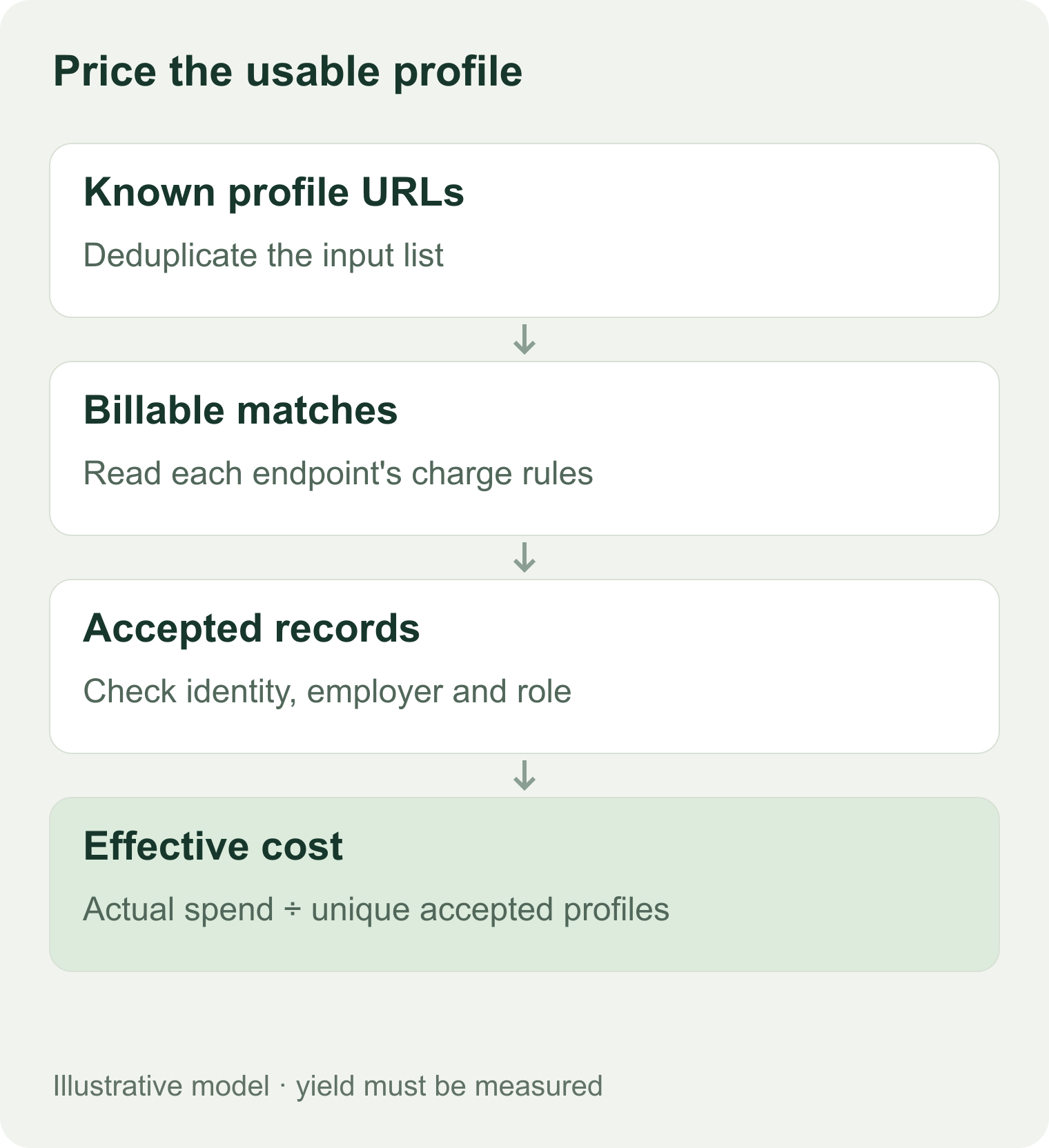
Illustrative budget model. A billable match and a usable profile can be different counts.
Test weak and changing records
Include a few recent employer changes, incomplete profiles, duplicate URLs, and people with similar names in the evaluation sample. Check whether the returned employer is current enough for your task and whether a missing field is distinguishable from an empty value.
Save retrieved_at as the time you received the result. Store a source-provided update date separately when available. A lookup performed today can return old information.
The profile evaluation worksheet gives you fields for original URL, identity review, required fields, freshness, charge, and final acceptance. It does not contain a fabricated provider response.
Calculate budgets for 100, 1,000, and 10,000 profiles
For a usage-priced lookup:
Estimated charge = billable calls × price per call + other charged operations.
Cost per usable profile = actual total charge ÷ accepted unique profiles.
Do not subtract rejected business records from the bill unless the provider's charge rules classify them as unbillable. A response can match a person and still miss a field you need.
A conservative call-budget ceiling
Using the inspected Glasser PDL rate of $0.30/call, one billable call per input gives:
| Unique profiles | Calls assumed billable | Lookup subtotal |
|---|---|---|
| 100 | 100 | $30 |
| 1,000 | 1,000 | $300 |
| 10,000 | 10,000 | $3,000 |
This is a simple planning ceiling for one call per input at that observed rate. It excludes extra attempts, optional validation, tax, infrastructure, and changes in price. It does not predict match coverage.
A hypothetical yield-based estimate
Now assume 80% of inputs return billable matches, the remaining 20% settle under the inspected $0 no-result clause, and 75% of the matched records meet your requirements. That produces usable records equal to 60% of the original list.
| Profiles submitted | Billable matches, assumed | Usable profiles, assumed | Charge at $0.30 | Cost per usable profile |
|---|---|---|---|---|
| 100 | 80 | 60 | $24 | $0.40 |
| 1,000 | 800 | 600 | $240 | $0.40 |
| 10,000 | 8,000 | 6,000 | $2,400 | $0.40 |
All percentages are teaching assumptions, not observed PDL or Glasser results. The example shows why a $0.30 call can produce a $0.40 usable-record cost. If no record passes acceptance, report the spend and zero yield; division by zero is not a meaningful unit cost.
Price a different target field separately
If your task is work-email retrieval, the inspected Prospeo Glasser rate may be relevant. For 800 billable matches at $0.02695, the lookup subtotal would be $21.56. You cannot use that number as a replacement quote for the PDL example without confirming the same required fields and acceptance rate.
The useful comparison is the total cost to satisfy your field contract. The smallest unit price is only one input.
Check the endpoint contract and refresh policy
Glasser documents a search, inspect, and run sequence. The inspect operation supplies input schema, version, price clauses, and output schema when available. Its documentation states that a version does not freeze the price: a new run uses the price at admission.
The saved PDL /v5/person/enrich contract was version 6. Prospeo /enrich-person was version 2. Both lacked a published output schema in the inspection. That is a reason to inspect a real authorized sample before implementing field mapping, not a reason to reconstruct a plausible response from memory.
No live profile lookup was executed for this guide. Glasser supports the inspected third-party operations; this article does not establish live access to a complete LinkedIn profile, hidden fields, or account messaging.
Ask four billing questions before importing the full list
- What counts as a billable success? A matched identity and a record meeting your field contract can differ.
- What happens when the provider returns no match or an error? Read each outcome clause.
- Does a repeat lookup create a new charge? Do not transfer a direct provider's caching or free-repeat policy to Glasser.
- Does “refresh” retrieve new source data? Ask about data age and cache behavior; a new request timestamp is insufficient evidence.
Glasser's run documentation specifies idempotent retries: reusing the same key and request returns the original run. That handles an ambiguous transport failure. It is not a promise that future refreshes are free.
For a scheduled CRM process, your own application should decide when a record needs a refresh and which fields can be overwritten. Keep manually reviewed values protected according to your policy. Do not describe those application rules as an automatic Glasser feature.
Questions about LinkedIn profile API costs
Is LinkedIn profile API access free?
Some official member permissions are available under their documented access conditions. That does not provide unrestricted lookup of arbitrary LinkedIn URLs. Third-party free trials and credits apply to those vendors' products and terms.
Does Sales Navigator include a profile-data API?
A seat purchase alone does not establish your application's permissions. Check the required integration program and approved access separately. LinkedIn's access guide identifies partner requirements for Sales Navigator API capabilities.
Can I compare a monthly account fee with a per-profile price?
Only after confirming that both routes can perform the same task. For the account model, divide the subscription and any other required costs by usable records at a feasible throughput. Keep provider limits, connected-account requirements, and access scope visible.
How do I get a dependable production budget?
Define the fields you need, evaluate a representative sample, and save the actual charge and acceptance decision for each record. Use those observed rates to build low, expected, and high scenarios for your full volume. Recheck access conditions and current prices before committing to the import.
Related posts

9 min read
LinkedIn Email Finder: Choose a Tool and Find the Right Work Email
Have a LinkedIn profile but need a work email? Compare tools and free limits, handle bulk lists, and check whether the address matches the current employer.

8 min read
Free People Search API: Find Candidates Before Paying for Contact Data
Find out what a free people search API returns before paying. Compare profile previews, enrichment, and contact-reveal costs for B2B prospecting.
Make your agent
work with real data.
Search, inspect, and run data APIs through one Glasser key. Turn your next question into a result you can use.
Get started with Glasser